Basics
The whole idea first, then the terms the rest of this page uses.
1.1Whole idea
Keep most of the app in React Native, where speed of delivery is highest. Move a feature to native code only for a reason you can state: the OS runs it with the app closed, it needs a platform API, it must keep keys out of JavaScript, or it holds the JS thread or moves a lot of data. Then guard performance with numbers in CI, judged on several runs and not one.
Most code can stay in React Native. A few pieces belong in native code, and CI should stop performance from slipping.
1.2Key concepts
One idea per card, in plain words.
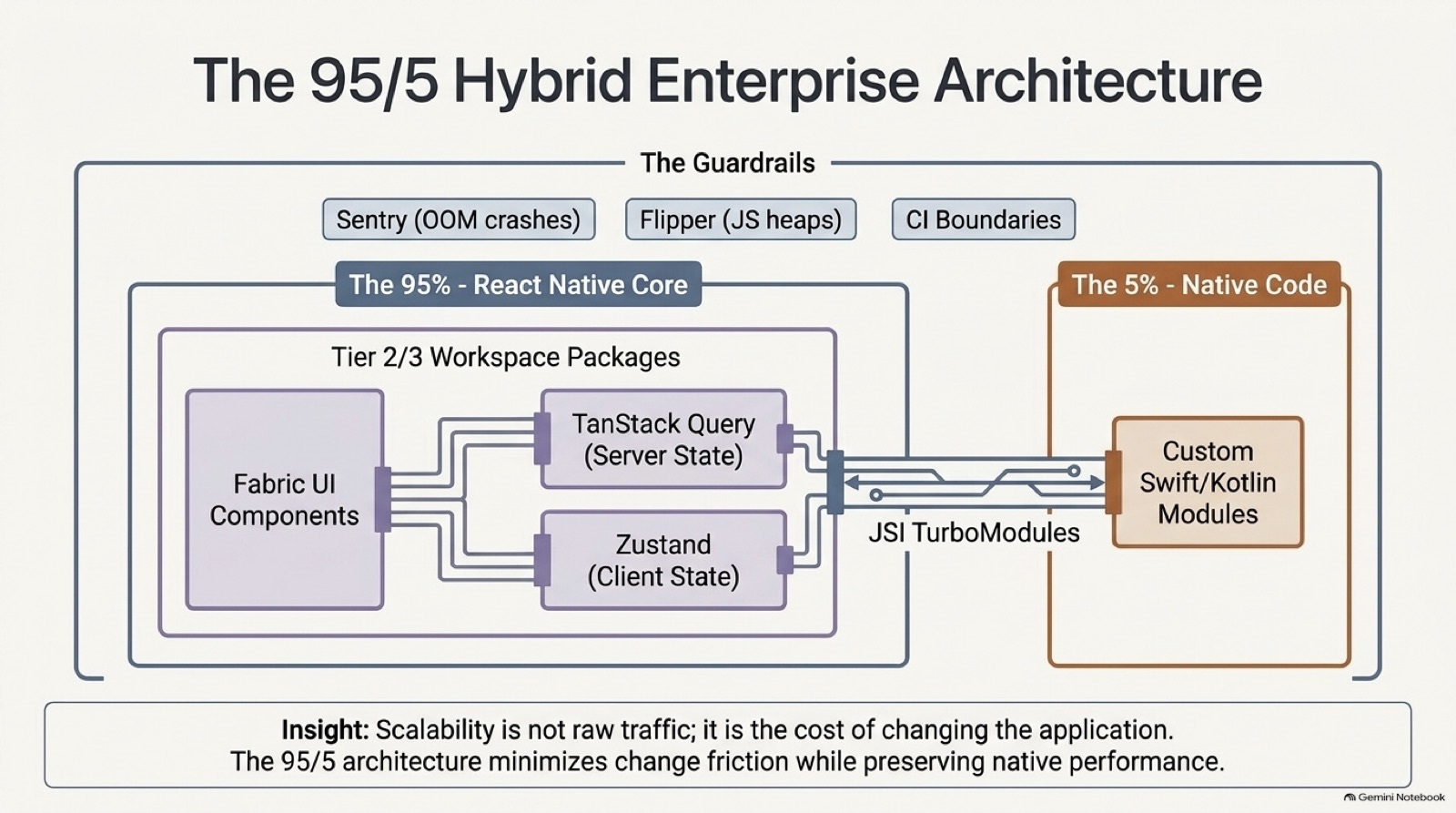
A guideline, not a law: roughly the bulk of the code stays shared, and a small, deliberate part is native.
Native code that JavaScript calls through a typed spec. Use it for platform APIs and heavy work.
A component the OS starts itself, such as a sync worker, so it can't depend on a screen or the UI runtime.
A limit on a metric, such as startup time or frame rate, enforced in CI.
A test that measures how long components take to render, and fails when they slow down. Reassure does this.
One run is noisy. Judge the middle value of five or more.
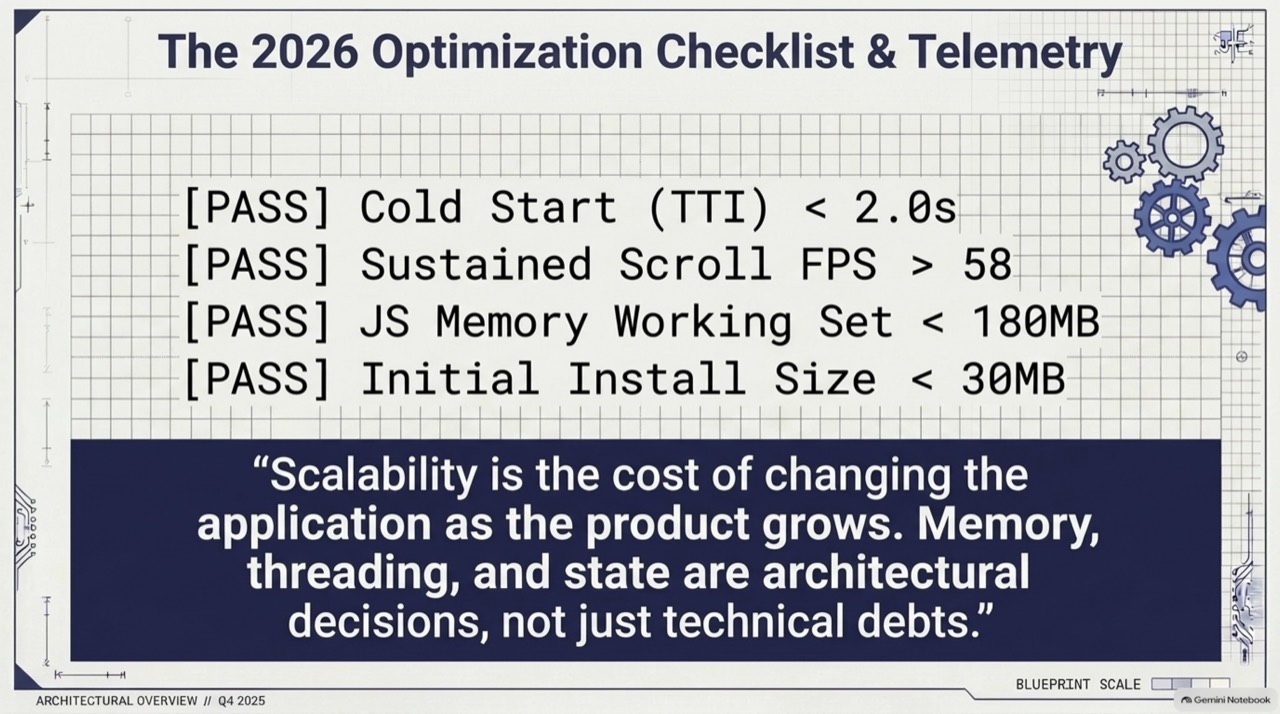
How costly it is to change the app. The slides argue scalability is about this, more than raw traffic, and the 95/5 split aims to keep it low.
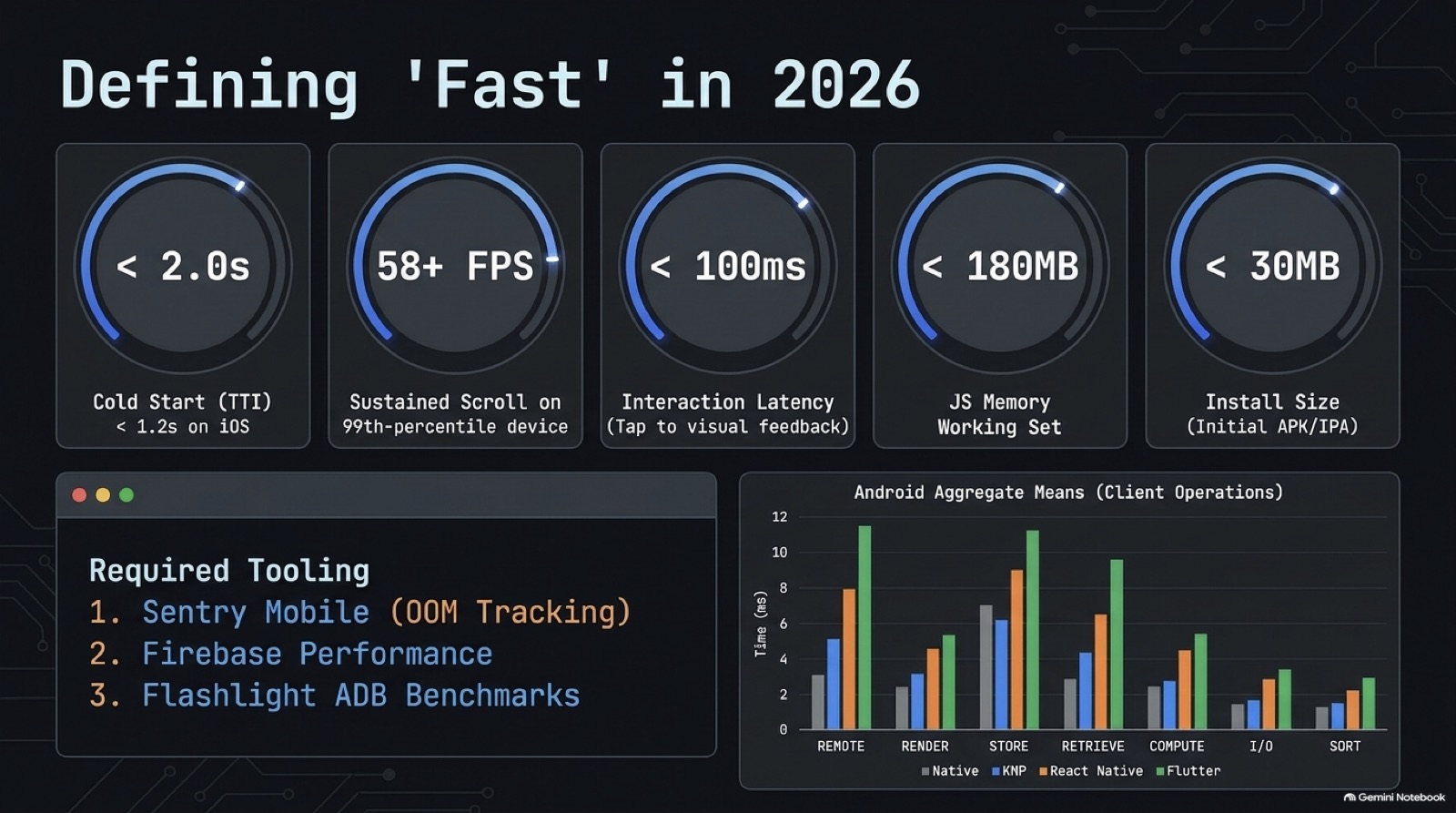
A number the build must stay under, such as cold start or install size. Set it from your own baseline, and fail the build when the median crosses it.
Question
What exactly you must answer, and what to settle before you start.
2.1Question
A platform team supports six React Native apps. Releases keep regressing startup and scrolling, and security wants key handling reviewed. Decide what goes native, and how to stop regressions.
2.2Clarify first
Each answer removes a guess.
| You ask | Answer |
|---|---|
| Which features run while the app is closed? | Sync and upload. |
| Where do keys and tokens live now? | Mostly in JavaScript, in a mix of storages. |
| What does CI measure today? | Test results and bundle size, and nothing about speed. |
Detailed answer
How it works, and how to build or explain it.
3.1Step by step
The mechanism, in the order you would explain it.
- List features and their needs
For each: does it run with the app closed, need a platform API, hold keys, block the JS thread, or move lots of data.
- Place each one
The code on this page does the sorting, so every decision comes with reasons you can show.
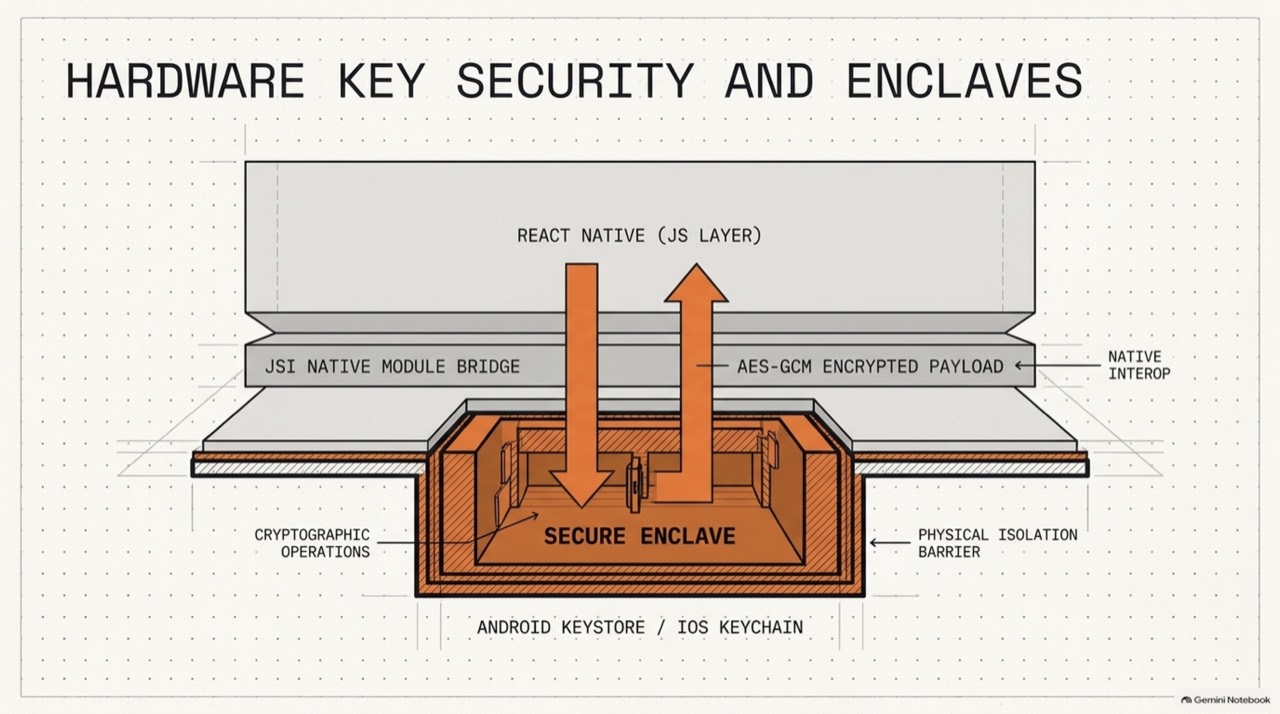
- Keep keys out of JavaScript
Generate and use keys in the Keystore or Keychain, and pass only results across the boundary.
- Choose budgets from your baseline
Measure the current release and set limits a little looser. Examples: cold start, scroll frame rate, JS memory, install size.
- Test render time
Run render regression tests on the components that matter, and fail the build on a clear slowdown.
- Test on real devices
Run scripted scroll flows on a mid-range phone, and score them.
- Judge medians, and keep a baseline
Fail on the limit, and also on a worse result than the last release by more than a tolerance.
3.2Where code belongs
| Feature | Placement | Reason |
|---|---|---|
| Screens, forms, navigation | React Native | Fastest to build and share |
| Sync worker | Native engine | The OS starts it with no screen |
| Encryption and key use | Native module | Keys stay out of JavaScript |
| Bluetooth stack | Native module | Platform API |
| Image decoding | Native module | Heavy data, off the JS thread |
3.3Code
Working code for the core of it.
Placing a feature
Turns the question 'should this be native?' into rules, so every answer comes with reasons.
1/* Decides where code should live: in React Native, in a native module, or in a native engine the OS can start. */2export interface Feature {3 name: string;4 /** the OS may run it with the app closed, such as a sync worker */5 runsWhileAppClosed: boolean;6 /** needs a platform API with no maintained JavaScript wrapper, such as a Bluetooth stack */7 needsPlatformApi: boolean;8 /** holds keys or tokens that must stay out of JavaScript */9 holdsKeyMaterial: boolean;10 /** the longest unbroken stretch of work on one call, in milliseconds */11 longestBlockMs: number;12 /** data moved through it, in megabytes per second */13 sustainedMBps: number;14}15 16export type Placement = "react-native" | "native-module" | "native-engine";17 18// Starting points. A frame lasts 16 ms at 60 fps, so half of it is the longest a call should hold the JS thread.19export const LIMITS = { blockMs: 8, MBps: 1 };20 21export function place(f: Feature): { placement: Placement; reasons: string[] } {22 const reasons: string[] = [];23 if (f.runsWhileAppClosed) reasons.push("the OS starts it with no screen, so it can't depend on the UI runtime");24 const toModule: string[] = [];25 if (f.needsPlatformApi) toModule.push("needs a platform API");26 if (f.holdsKeyMaterial) toModule.push("keys must stay out of JavaScript");27 if (f.longestBlockMs > LIMITS.blockMs) toModule.push(`blocks the JS thread for ${f.longestBlockMs} ms`);28 if (f.sustainedMBps > LIMITS.MBps) toModule.push(`moves ${f.sustainedMBps} MB/s`);29 reasons.push(...toModule);30 const placement: Placement = f.runsWhileAppClosed ? "native-engine" : toModule.length > 0 ? "native-module" : "react-native";31 return { placement, reasons };32}f.runsWhileAppClosed ? "native-engine"- If the OS starts it with no screen, it can't rely on the UI runtime, so it gets its own native engine.
f.longestBlockMs > LIMITS.blockMs- Half a 16 ms frame is the most one call should hold the JS thread.
f.holdsKeyMaterial- Keys stay out of JavaScript, so the work that uses them runs in native code.
const LIMITS- Starting points, and not facts. Set your own from measurements.
Tested by npm run test:modules.
A budget gate for CI
Fails a build when performance breaks a limit or slips against the last release, and judges the median so one noisy run can't decide.
1/* A CI gate for performance numbers. Single runs are noisy, so it judges the median of several. */2export interface Budget {3 metric: string;4 /** the limit: a maximum, or a minimum when higherIsBetter */5 limit: number;6 higherIsBetter?: boolean;7}8export interface Row {9 metric: string;10 value: number;11 pass: boolean;12 why: string;13}14 15export function median(values: number[]): number {16 if (values.length === 0) throw new Error("no runs");17 const s = [...values].sort((a, b) => a - b);18 const mid = s.length >> 1;19 return s.length % 2 ? s[mid] : (s[mid - 1] + s[mid]) / 2;20}21 22export function gate(runs: Record<string, number[]>, budgets: Budget[], baseline: Record<string, number> = {}, tolerancePct = 5, minRuns = 5) {23 const rows: Row[] = budgets.map((b) => {24 const samples = runs[b.metric] ?? [];25 if (samples.length < minRuns) return { metric: b.metric, value: NaN, pass: false, why: `only ${samples.length} runs, need ${minRuns}` };26 const value = median(samples);27 const within = b.higherIsBetter ? value >= b.limit : value <= b.limit;28 if (!within) return { metric: b.metric, value, pass: false, why: `${value} breaks the limit of ${b.limit}` };29 const before = baseline[b.metric];30 if (before !== undefined) {31 const worse = b.higherIsBetter ? ((before - value) / before) * 100 : ((value - before) / before) * 100;32 if (worse > tolerancePct) return { metric: b.metric, value, pass: false, why: `${worse.toFixed(1)}% worse than the baseline of ${before}` };33 }34 return { metric: b.metric, value, pass: true, why: "within budget" };35 });36 return { pass: rows.every((r) => r.pass), rows };37}samples.length < minRuns- Too few runs can't be trusted, so the gate fails and asks for more.
b.higherIsBetter ? value >= b.limit : value <= b.limit- Frame rate needs a minimum, and startup needs a maximum.
tolerancePct- A build can stay inside the limit and still be worse than last time. The tolerance catches slow drift.
export function median- Sorting and taking the middle ignores one slow outlier.
Tested by npm run test:modules.
3.4Slides
From the source decks this page draws on. Swipe, use the arrows, or press the left and right keys. Notes flag where a slide's numbers or flow differ from this page.
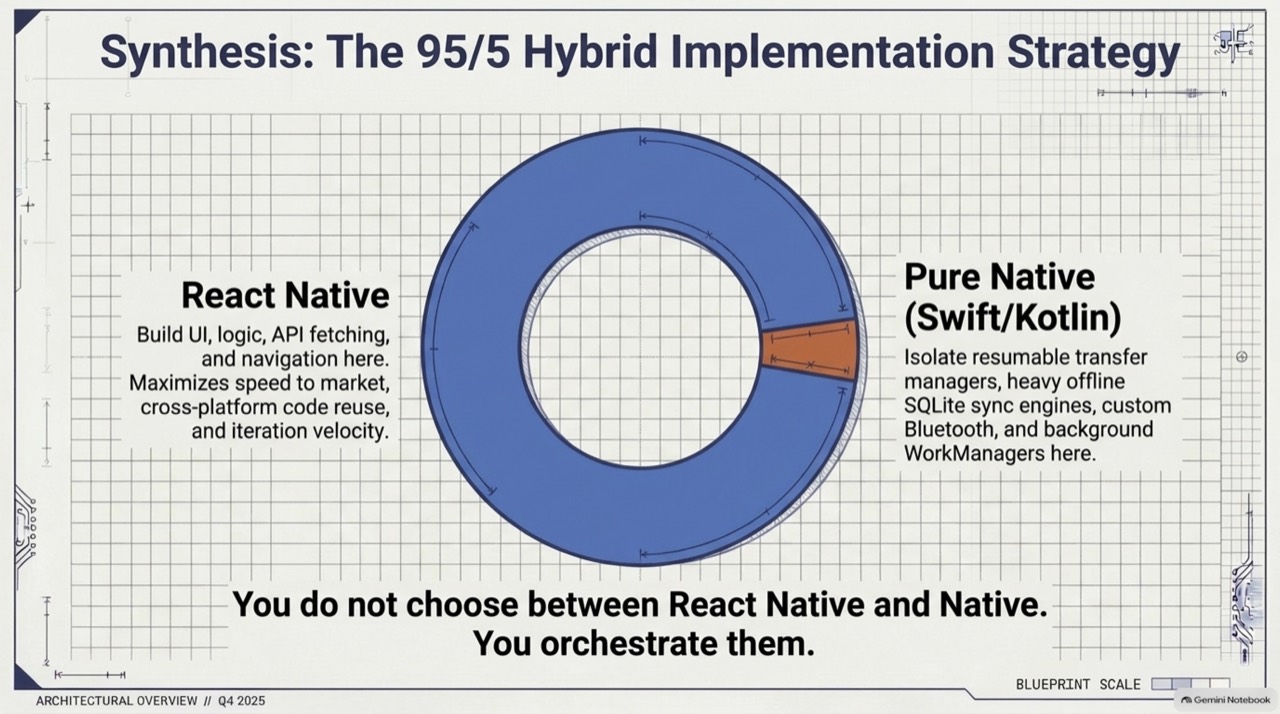 ‹›
Orchestrate both. Do not choose between them.
- Orchestrate both. Do not choose between them.
- Keys stay in secure hardware, and JavaScript gets results.
- Example budgets. Set yours from your own baseline.
- Five example budgets, and the tools that watch them.
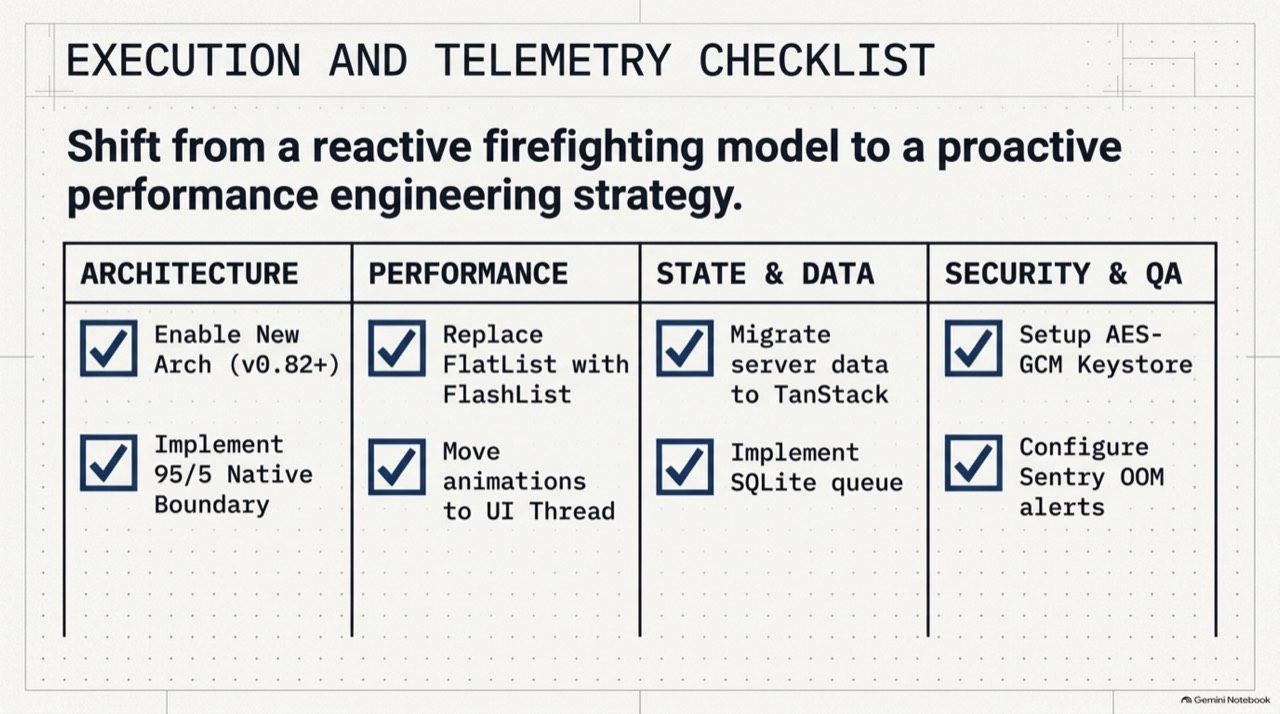
- A rollout checklist across the four areas.
- The 95/5 split, and the guardrails around it.
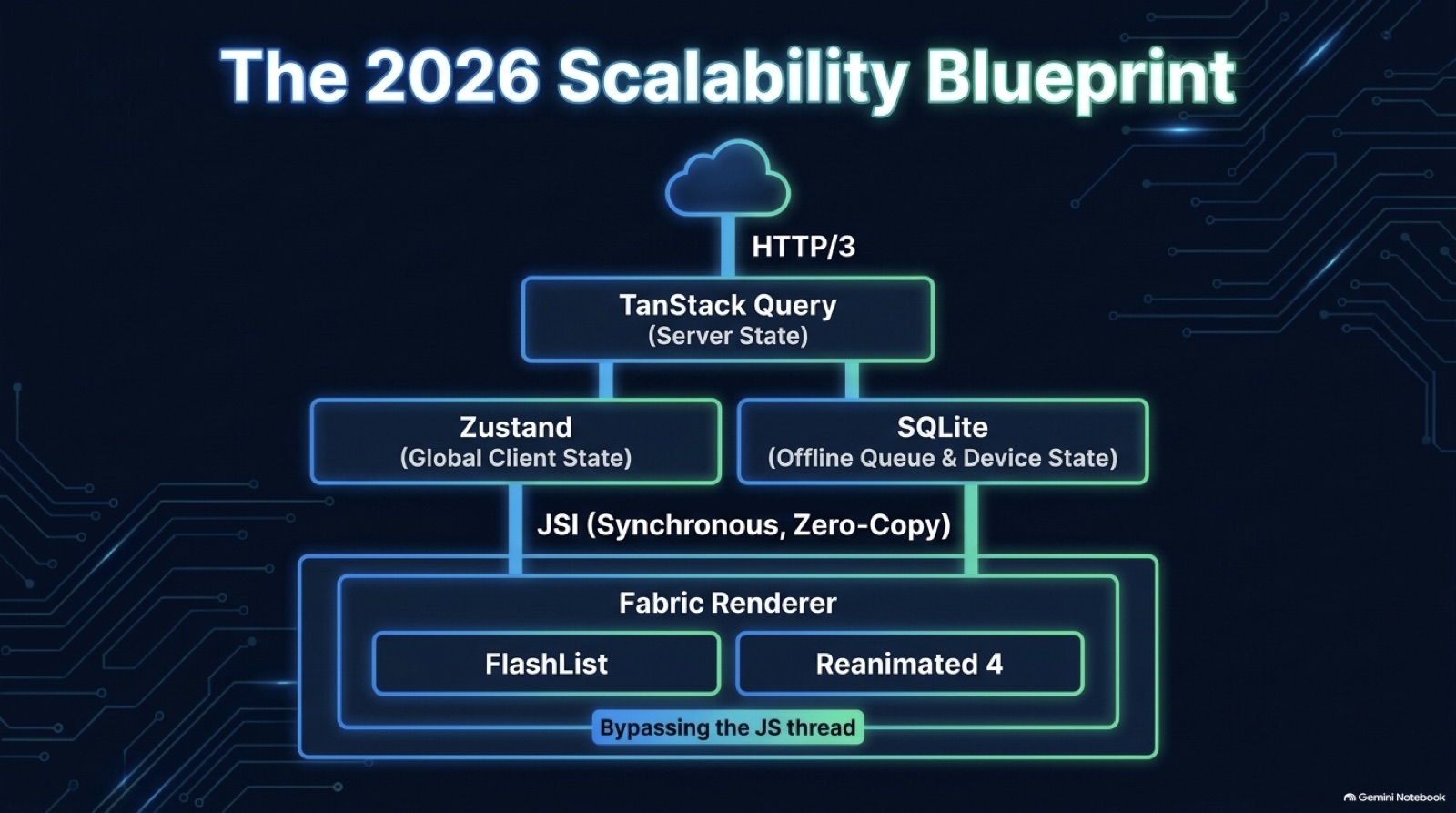
- The whole stack in one picture, from network to renderer.
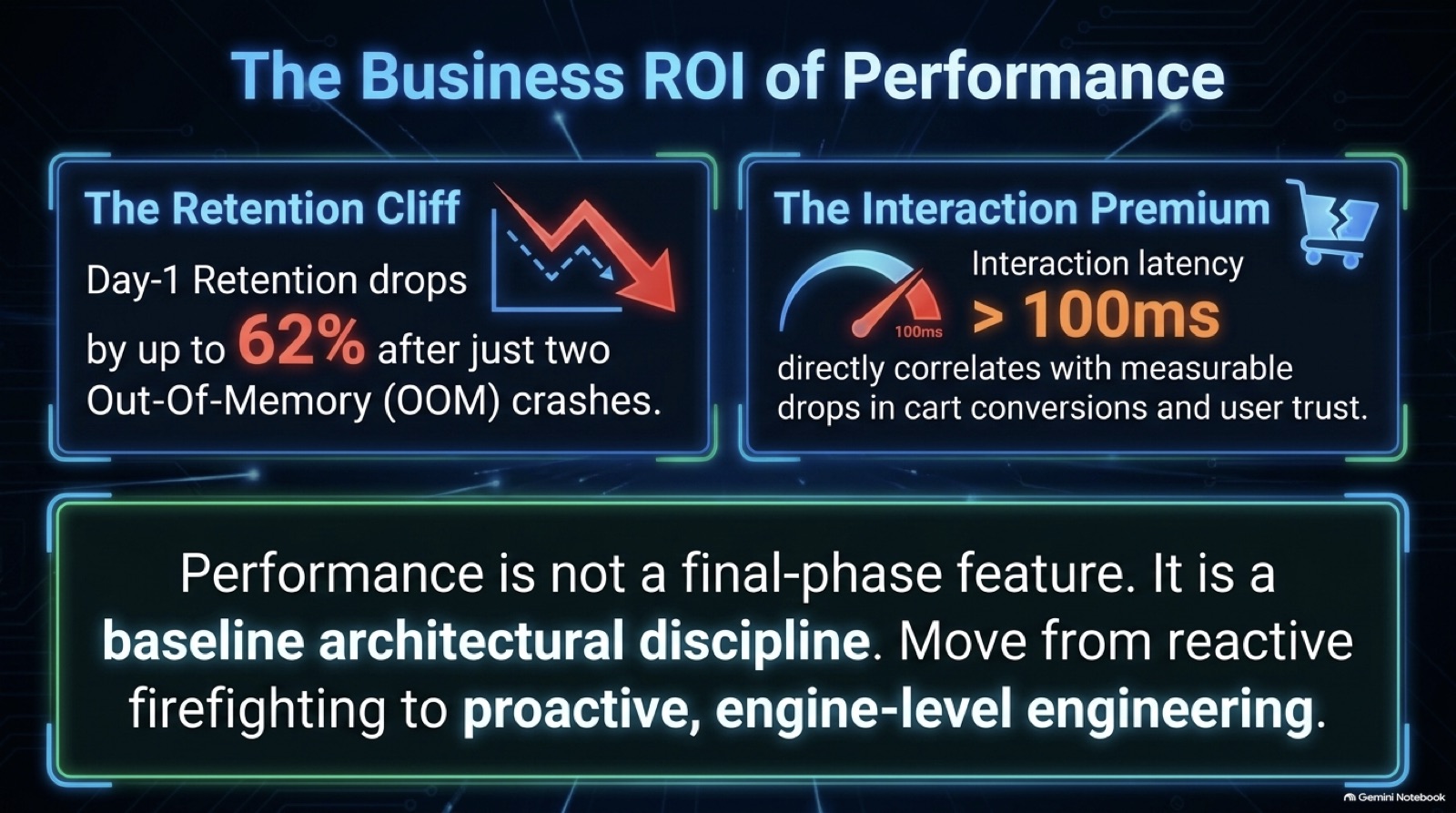
- Why performance work is a business case, and not only a technical one.
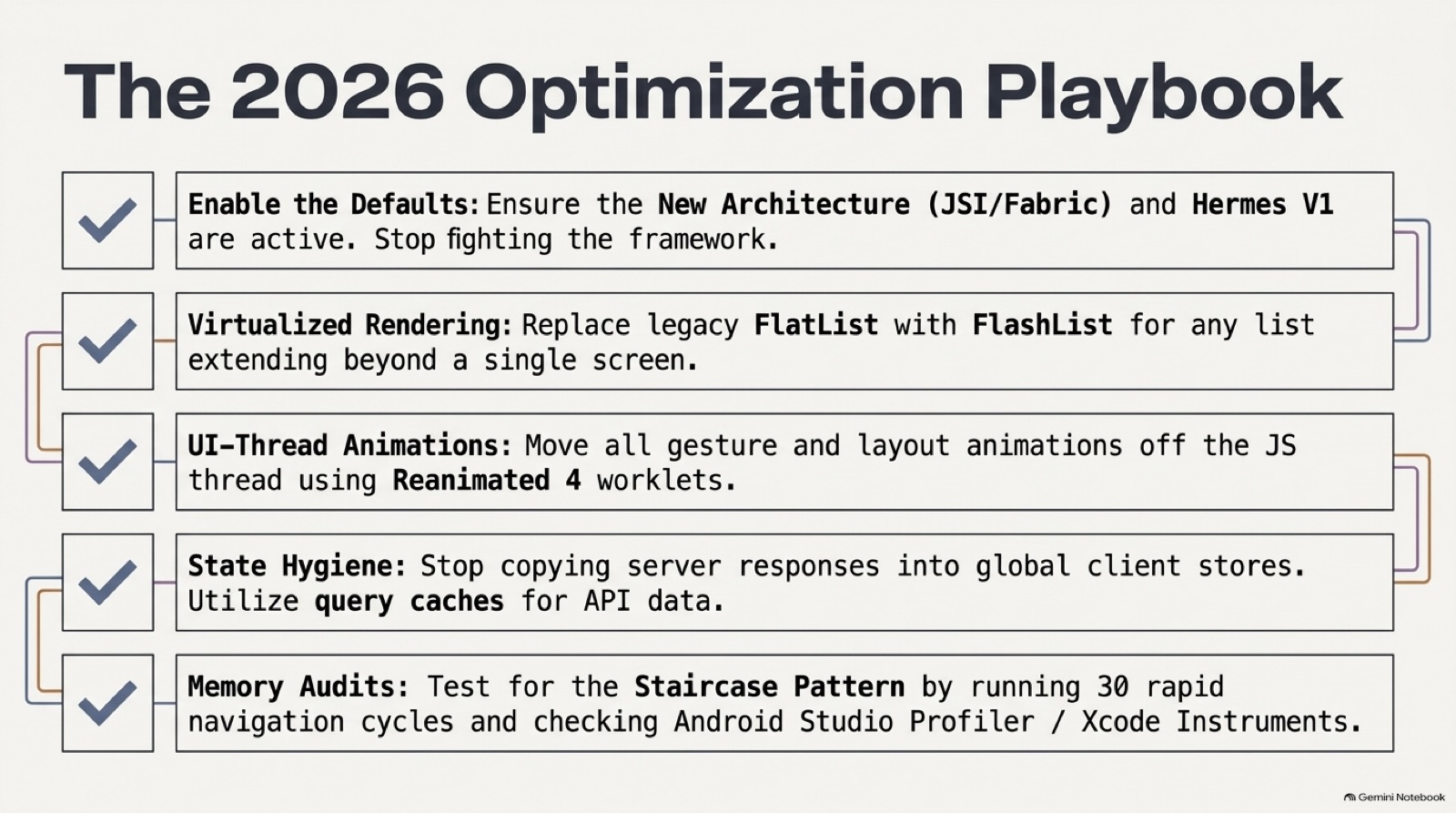
- The five-item optimisation checklist.
Q&A
What interviewers ask next. Answer out loud, then open.
4.1Interview questions
Is 95/5 a rule?
Why not run the sync engine in JavaScript?
A native module checks that a key alias exists, and calls it attestation. Is it?
Why judge the median, not one run?
Where do budget numbers come from?
What goes in the native 5 percent?
Which five checks start a performance pass?
Which five budgets would you track first?
How do you make the business case for performance work?
Extra depth
Edge cases, counterpoints and what to read next.
5.1Edge cases and counterpoints
Includes the strongest argument against this approach.
Show detailsHide details
- Library hygiene
- Native libraries add upkeep. Audit for unmaintained packages in CI, and prefer fewer, maintained ones.
- Storage libraries change
- Android's Jetpack security-crypto library has been deprecated. Check what is current before building on it.
- Counterpoint
- Too many budgets slow every merge. Start with startup and scroll, and add one when a real regression gets through.
- A starting checklist
- Enable the defaults first, then lists, animation, state hygiene and memory audits. Each item maps to one of the other pages in this series, so use it as a table of contents for a review.
- The stack in one picture
- A server cache fed by the network, a small client store, a local database for the queue, and a renderer with a recycling list and UI-thread animation. Each layer has one job, so a problem points to one place.