Basics
The whole idea first, then the terms the rest of this page uses.
1.1Whole idea
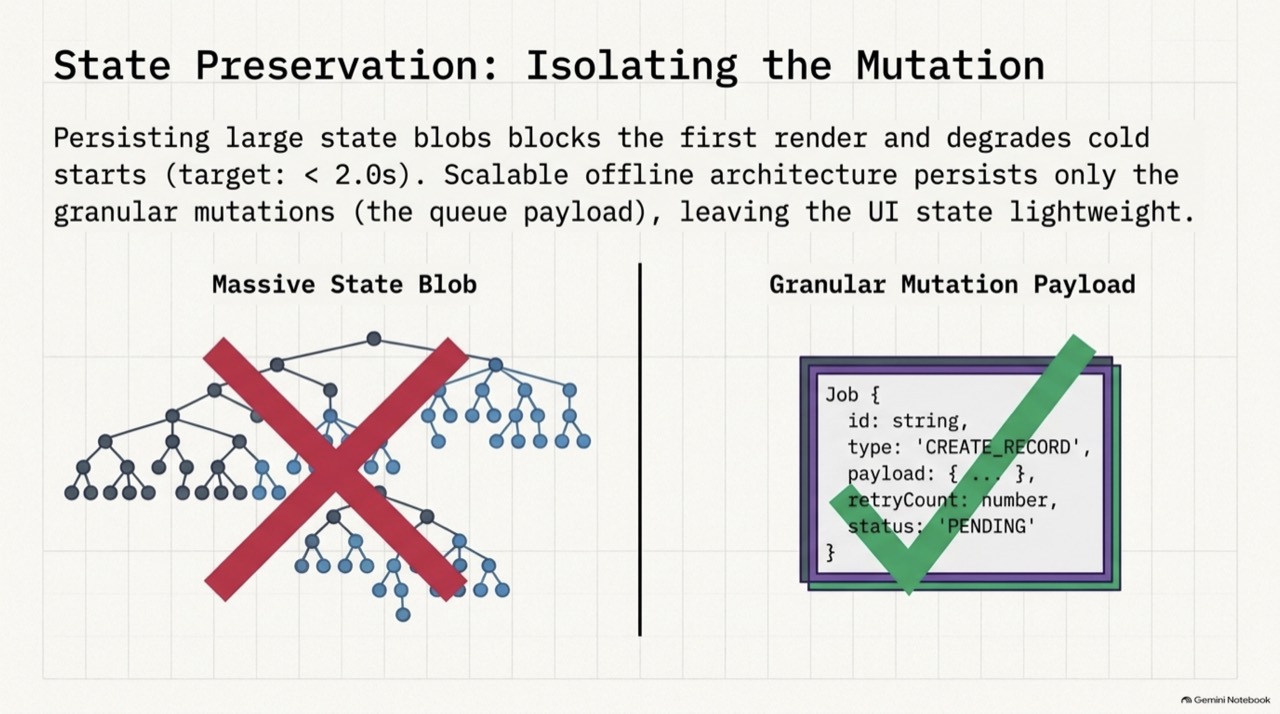
The user's change must reach the disk before anything else happens, in the same transaction as the queue entry that will send it. Persist only the small mutation, and not a large copy of app state. A drain loop sends entries in order, keeps conflicts and failures visible, retries server trouble with backoff, and survives a crash because every send carries a key.
A queue held in memory loses unsent changes when the OS kills the app. Persist the mutations, and keep them atomic with the local write.
1.2Key concepts
One idea per card, in plain words.
One recorded change: the method, the endpoint, a small payload, and a status.
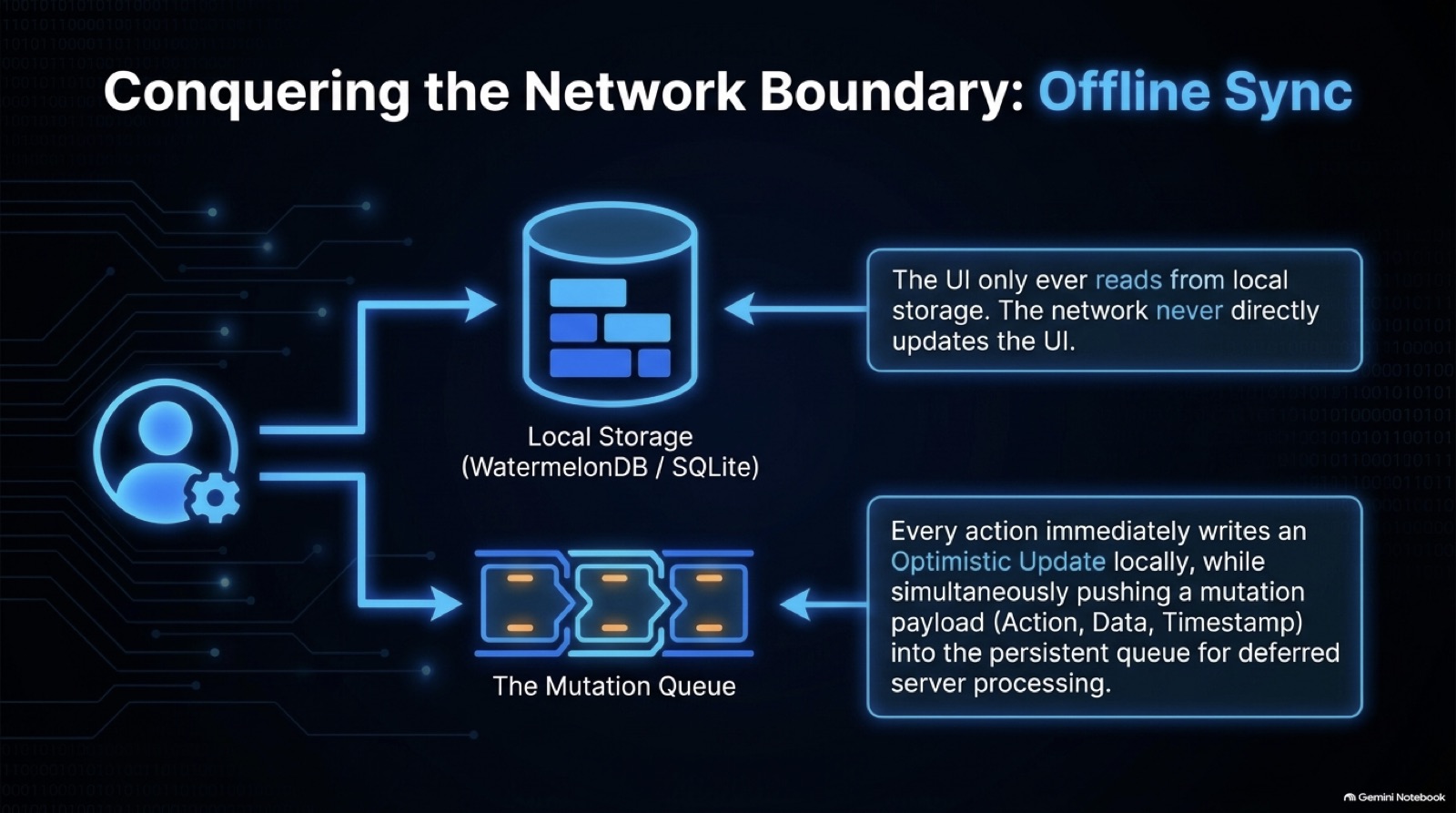
The screen shows the result straight away, before the server has agreed.
The local row and the queue row commit together, or neither does.
A stable id sent with each attempt, so a resend after a crash doesn't apply the change twice.
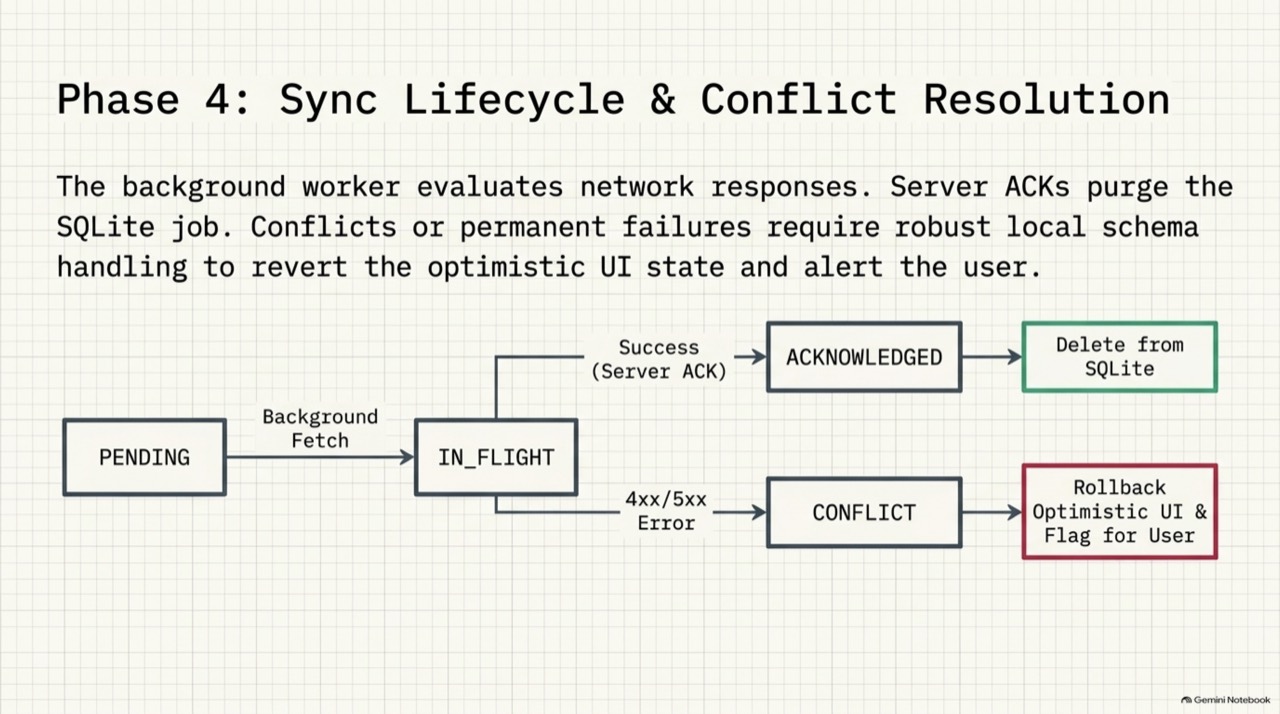
PENDING, IN_FLIGHT, then removed on success. CONFLICT and FAILED stay on disk until someone resolves them.
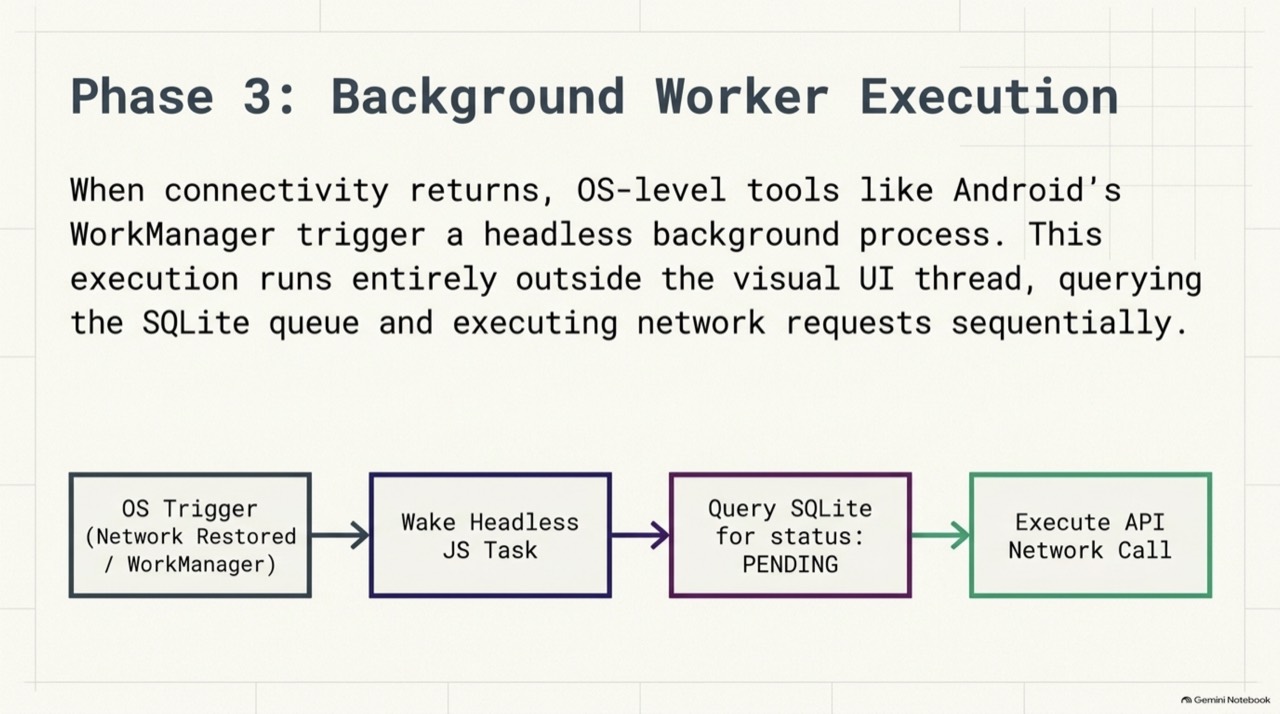
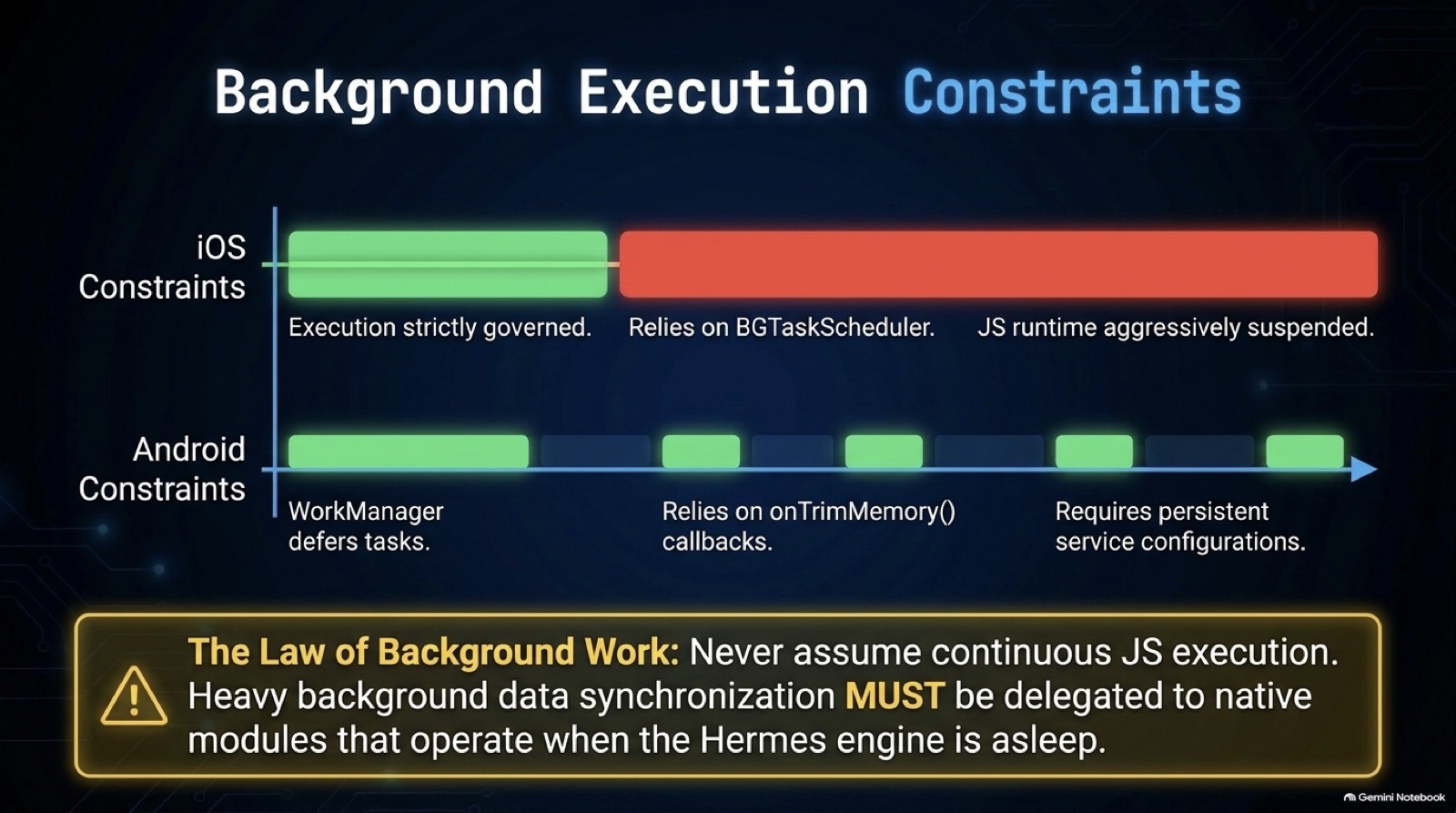
JavaScript run by the OS with no screen. Android can start one, and may stop it early, so long syncs belong in native workers.
The UI and the local database change at once, before the server answers. If the server rejects the change, you roll it back.
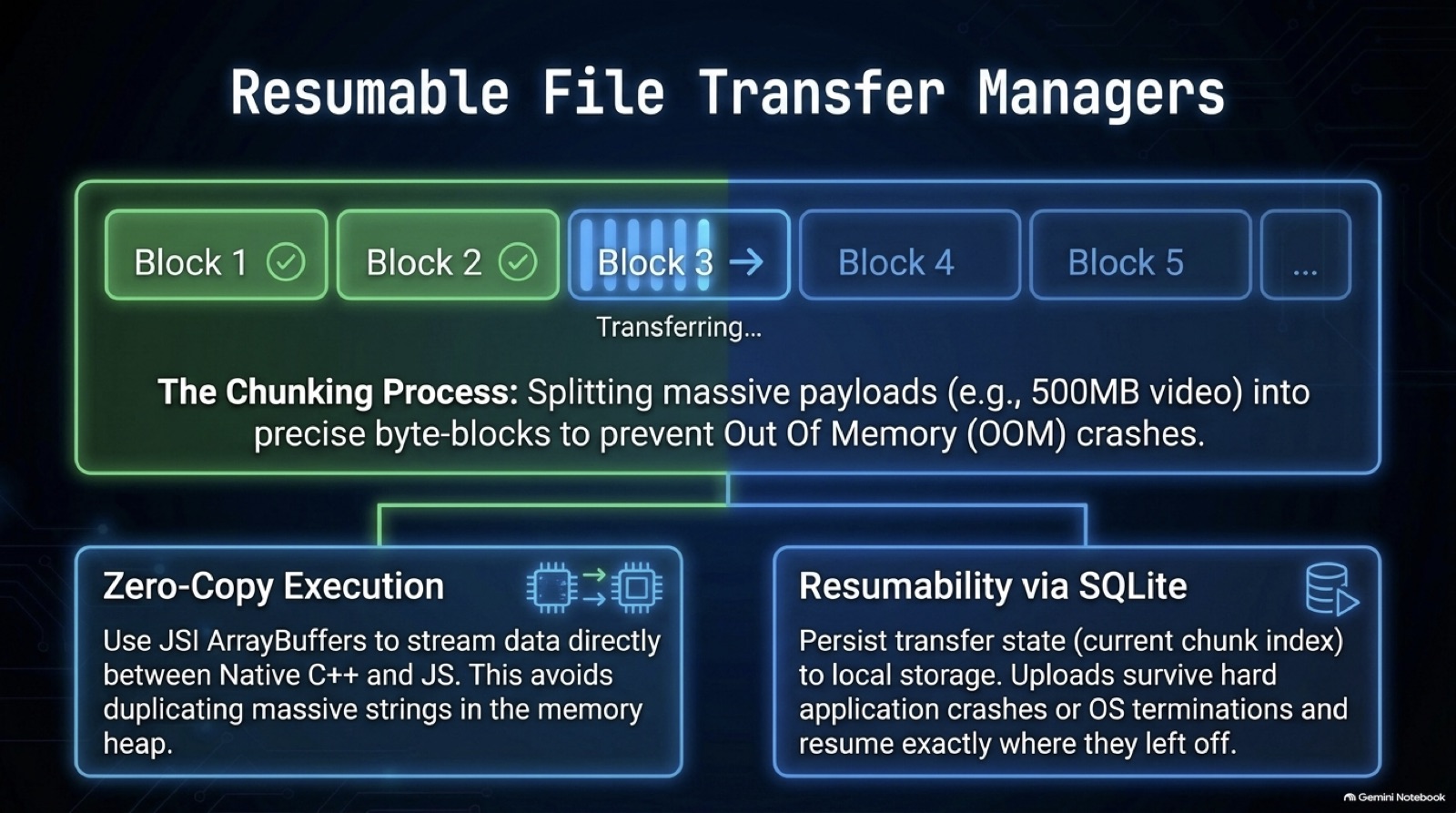
A large file is sliced into parts, and the app records which parts the server holds. After a drop, the upload resumes from the first missing part.
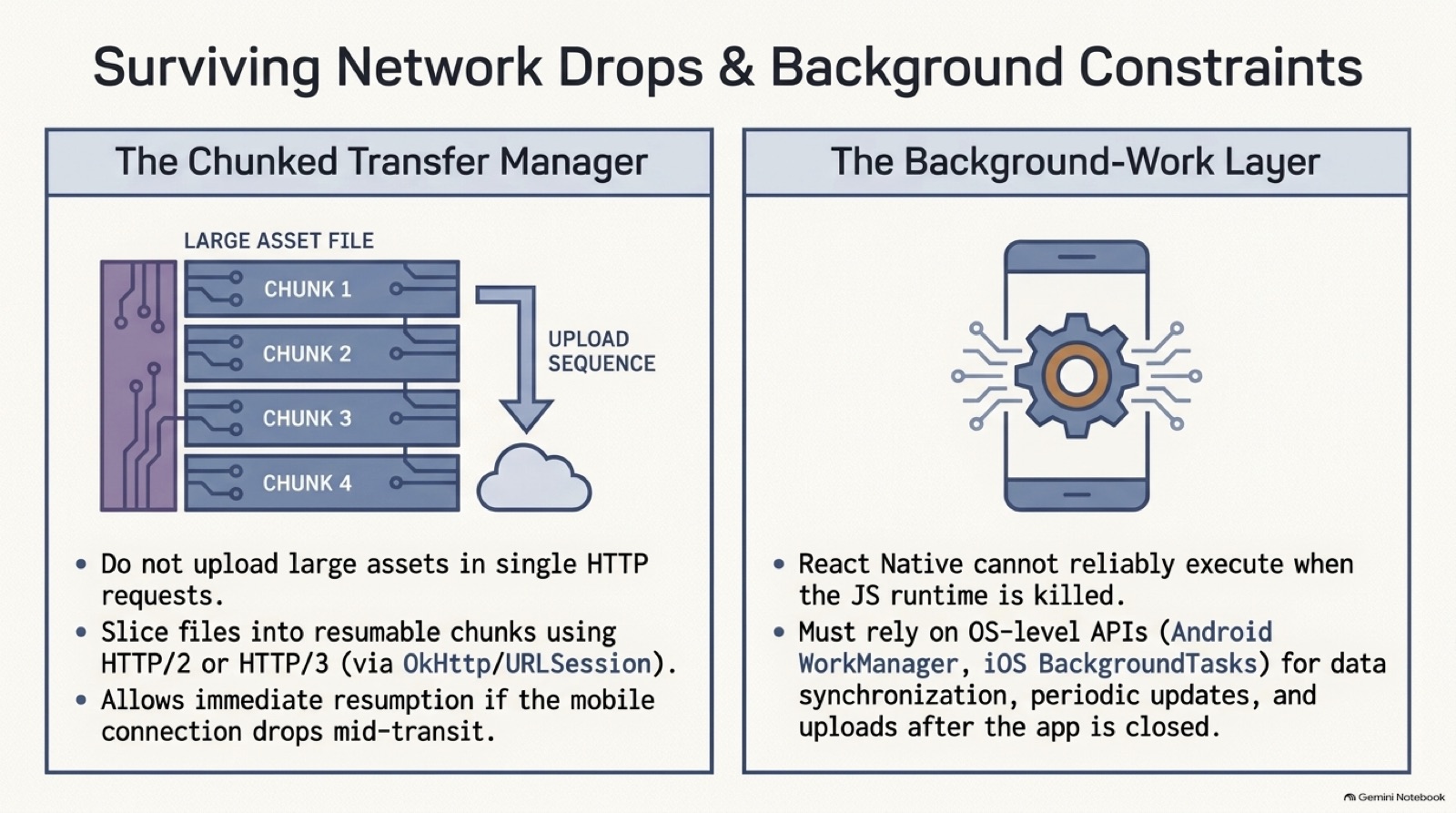
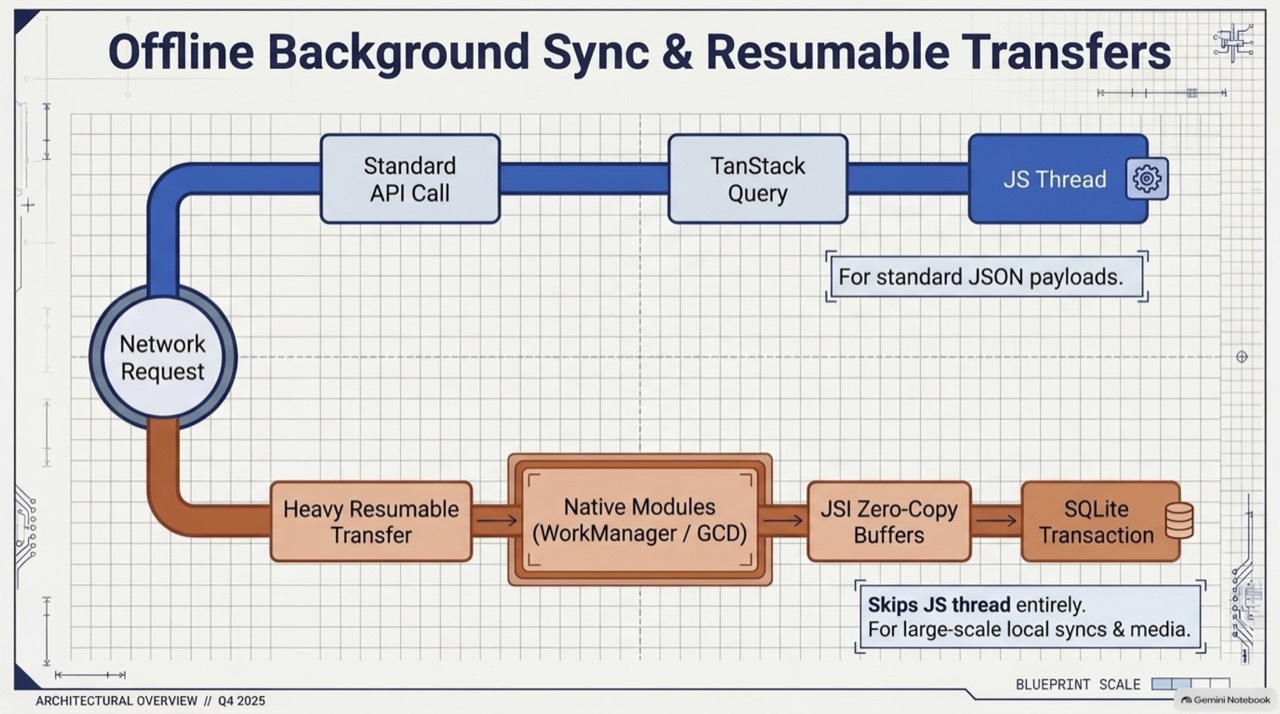
WorkManager on Android and background tasks on iOS can run when your JavaScript runtime has been killed. React Native code cannot be relied on to run then.
The UI reads only from local storage. The network updates the database, and the database updates the screen, so the screen never waits on the network.
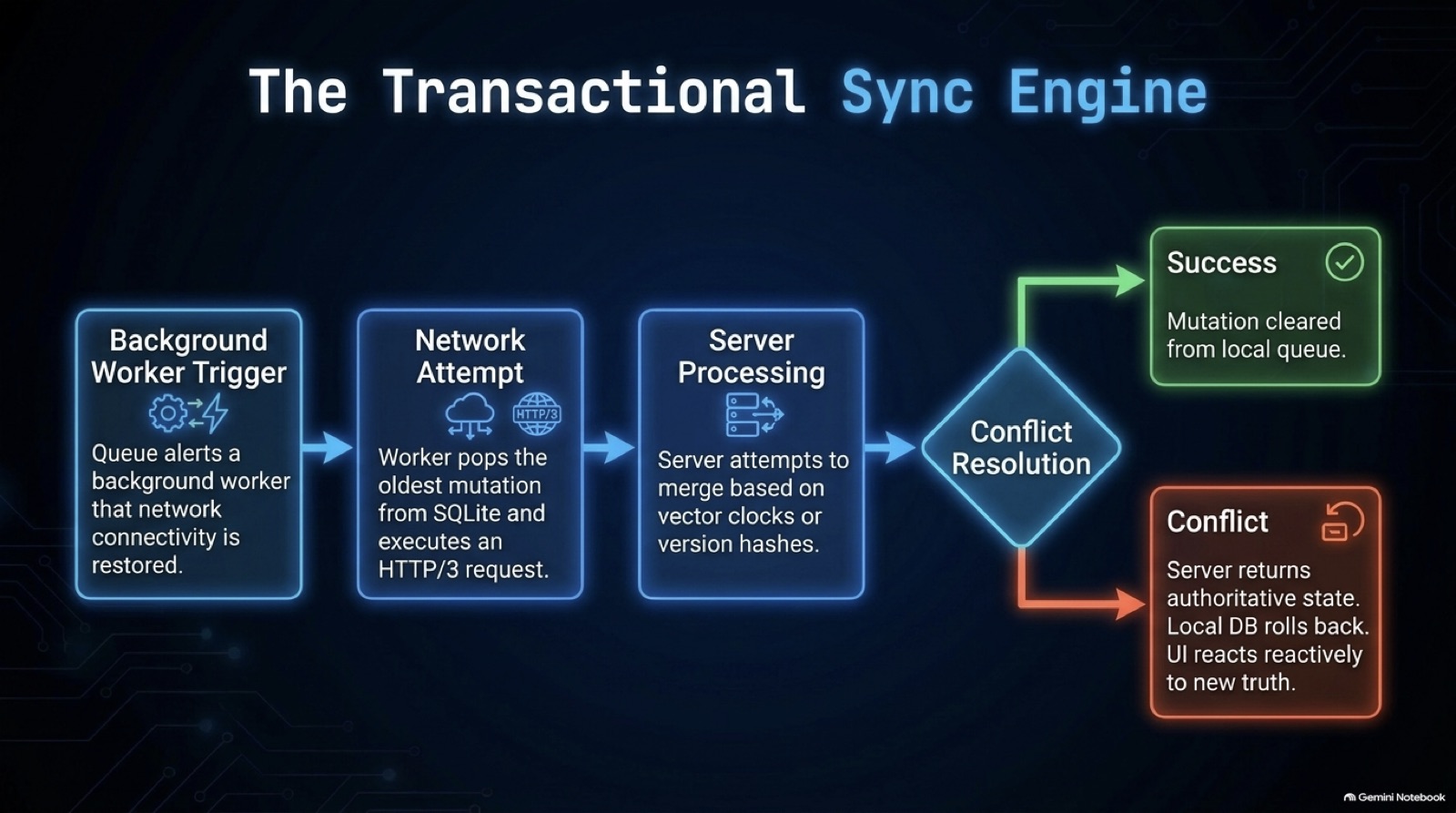
The server compares a version number, hash or clock sent with the change. If they differ, it returns the authoritative state and the app rolls back its optimistic write.
Question
What exactly you must answer, and what to settle before you start.
2.1Question
Field staff edit jobs in basements. Their changes must survive the OS killing the app, and reach the server in order once there is signal. Design the queue in React Native.
2.2Clarify first
Each answer removes a guess.
| You ask | Answer |
|---|---|
| Can one change depend on another? | Yes. A status update must not overtake the edit it follows. |
| What happens when the server has a newer version? | The user should see both and choose. |
| How large are the changes? | Small fields and notes. Photos use a separate resumable upload. |
Detailed answer
How it works, and how to build or explain it.
3.1Architecture
The components and how they connect.
3.2Step by step
The mechanism, in the order you would explain it.
- Write the data and the queue entry together
One transaction updates the local row and inserts the pending mutation. If either fails, neither is saved.
- Show the local row
The screen reads the database, directly or through a cache seeded from it. The change appears at once.
- Drain in order, one run at a time
Take the oldest pending entry, mark it in flight, send it with its id as the key. Two triggers must not start two runs.
- Stop when the network fails
Put the entry back to pending and stop. Later changes must never overtake it.
- Keep conflicts and rejections
A 409 becomes CONFLICT for the user to resolve. Another 4xx becomes FAILED with the reason. Deleting either loses the user's work.
- Back off on server trouble
For 429 and 5xx, wait longer each time and stop after a limit. Don't hammer a struggling server.
- Recover after a crash
At startup, return IN_FLIGHT entries to pending. The key makes a resend safe.
3.3What to persist
| Kind | Typical tool | Persist? | Why |
|---|---|---|---|
| Server cache | TanStack Query, RTK Query | Optional | It can be fetched again |
| UI and session state | Zustand, Context | No | Cheap to rebuild |
| Unsent mutations | SQLite, WatermelonDB | Yes, always | The only copy of the user's work |
| Form drafts | A form library | No | Lost on unmount, by design |
3.4Code
Working code for the core of it.
A mutation queue that survives the OS
An offline queue with the rules that a quick version gets wrong: atomic enqueue, order, visible conflicts, backoff and crash recovery.
1/* An offline mutation queue, written to fix what a quick version gets wrong. The database here is in memory, and the2 transaction rule is the same one SQLite gives you: the local row and the queue row commit together, or neither does. */3export type Status = "PENDING" | "IN_FLIGHT" | "CONFLICT" | "FAILED";4export interface Mutation {5 id: string;6 method: "POST" | "PUT" | "PATCH" | "DELETE";7 endpoint: string;8 body: string;9 status: Status;10 attempts: number;11 createdAt: number;12 /** not before this time, set by backoff */13 nextAt: number;14 lastError?: string;15}16export type Sender = (req: { method: string; endpoint: string; body: string; idempotencyKey: string }) => Promise<{ status: number }>;17 18export class MemoryDb {19 rows = new Map<string, unknown>();20 queue: Mutation[] = [];21 transaction<T>(fn: (rows: Map<string, unknown>, queue: Mutation[]) => T): T {22 const rows = new Map(this.rows);23 const queue = this.queue.map((m) => ({ ...m }));24 const result = fn(rows, queue);25 this.rows = rows;26 this.queue = queue;27 return result;28 }29}30 31export interface Options {32 now: () => number;33 baseDelayMs: number;34 maxAttempts: number;35}36 37export class MutationQueue {38 private running?: Promise<void>;39 private db: MemoryDb;40 private send: Sender;41 private opts: Options;42 constructor(db: MemoryDb, send: Sender, opts: Options) {43 this.db = db;44 this.send = send;45 this.opts = opts;46 }47 48 /** The screen reads the local row, so it updates at once. The queue row records what the server still has to hear. */49 enqueue(m: Pick<Mutation, "id" | "method" | "endpoint" | "body">, writeLocal: (rows: Map<string, unknown>) => void): void {50 this.db.transaction((rows, queue) => {51 writeLocal(rows);52 queue.push({ ...m, status: "PENDING", attempts: 0, createdAt: this.opts.now(), nextAt: 0 });53 });54 }55 56 /** After a crash, anything marked IN_FLIGHT may or may not have reached the server. Sending it again is safe, because of the key. */57 recover(): void {58 this.db.transaction((_rows, queue) => queue.forEach((m) => m.status === "IN_FLIGHT" && (m.status = "PENDING")));59 }60 61 drain(): Promise<void> {62 this.running ??= this.run().finally(() => (this.running = undefined));63 return this.running;64 }65 66 private async run(): Promise<void> {67 for (;;) {68 const next = this.db.queue.filter((m) => m.status === "PENDING").sort((a, b) => a.createdAt - b.createdAt)[0];69 if (!next || next.nextAt > this.opts.now()) return;70 this.mark(next.id, { status: "IN_FLIGHT" });71 let status: number;72 try {73 status = (await this.send({ method: next.method, endpoint: next.endpoint, body: next.body, idempotencyKey: next.id })).status;74 } catch {75 // No network. Stop here, so later changes never overtake this one.76 this.mark(next.id, { status: "PENDING" });77 return;78 }79 if (status >= 200 && status < 300) this.db.queue = this.db.queue.filter((m) => m.id !== next.id);80 else if (status === 409) this.mark(next.id, { status: "CONFLICT", lastError: "server has a newer version" });81 else if (status === 429 || status >= 500) {82 const attempts = next.attempts + 1;83 if (attempts >= this.opts.maxAttempts) this.mark(next.id, { status: "FAILED", attempts, lastError: `gave up after HTTP ${status}` });84 else {85 this.mark(next.id, { status: "PENDING", attempts, nextAt: this.opts.now() + this.opts.baseDelayMs * 2 ** (attempts - 1), lastError: `HTTP ${status}` });86 return; // the server is unwell, so wait before trying anything87 }88 } else this.mark(next.id, { status: "FAILED", lastError: `HTTP ${status}` });89 }90 }91 92 private mark(id: string, patch: Partial<Mutation>) {93 this.db.queue = this.db.queue.map((m) => (m.id === id ? { ...m, ...patch } : m));94 }95}this.db.transaction((rows, queue) => {- The local row and the queue row commit together. If the local write throws, the queue row isn't saved either.
this.running ??= this.run()- Single flight. Two triggers that fire at once share one drain, so no change is sent twice.
No network. Stop here- A failed send puts the entry back and stops, so a later change can't overtake it.
status === 409- A conflict stays on disk for the user to resolve. Deleting it would lose their work silently.
2 ** (attempts - 1)- The wait doubles after each failure, and the entry is marked FAILED after the last attempt.
idempotencyKey: next.id- The same key on every attempt lets the server ignore a repeat.
recover()- After a crash, an IN_FLIGHT entry may or may not have arrived. Back to pending, and the key makes the resend safe.
Tested by npm run test:modules.
3.5Slides
From the source decks this page draws on. Swipe, use the arrows, or press the left and right keys. Notes flag where a slide's numbers or flow differ from this page.
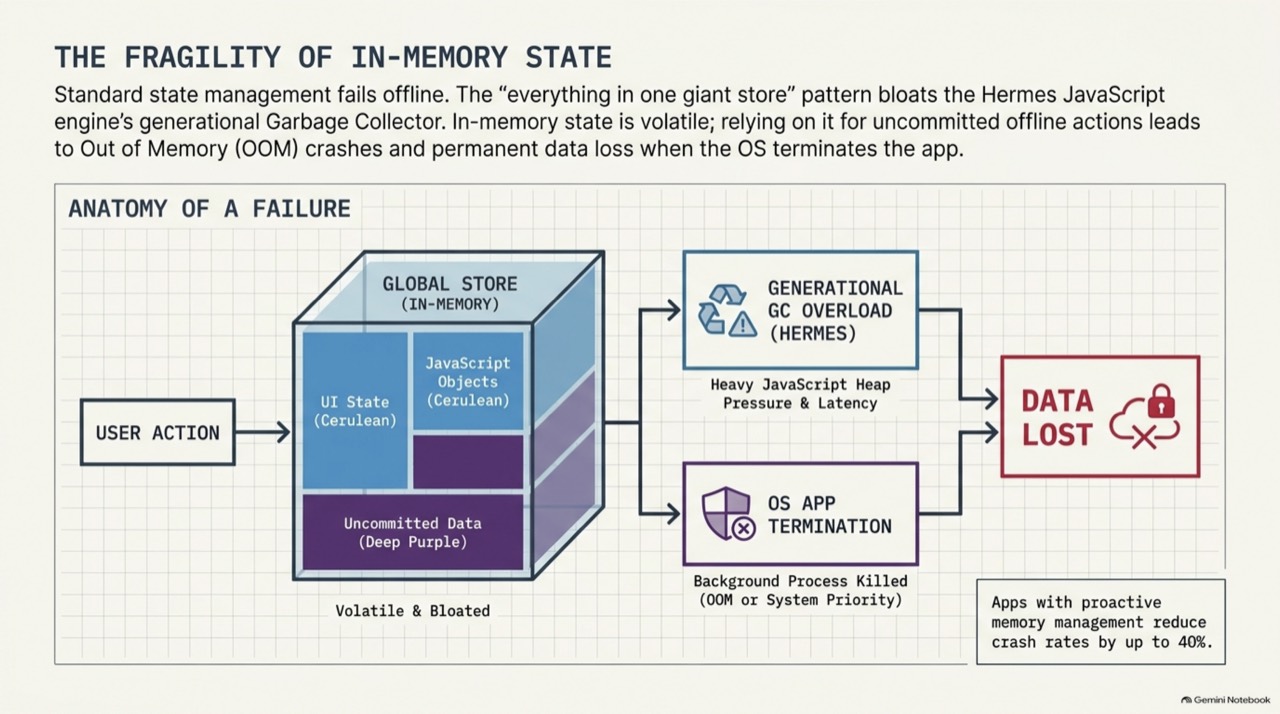 ‹›
Why in-memory state loses unsent changes.The crash-rate figure on this slide has no source we could check.
- Why in-memory state loses unsent changes.
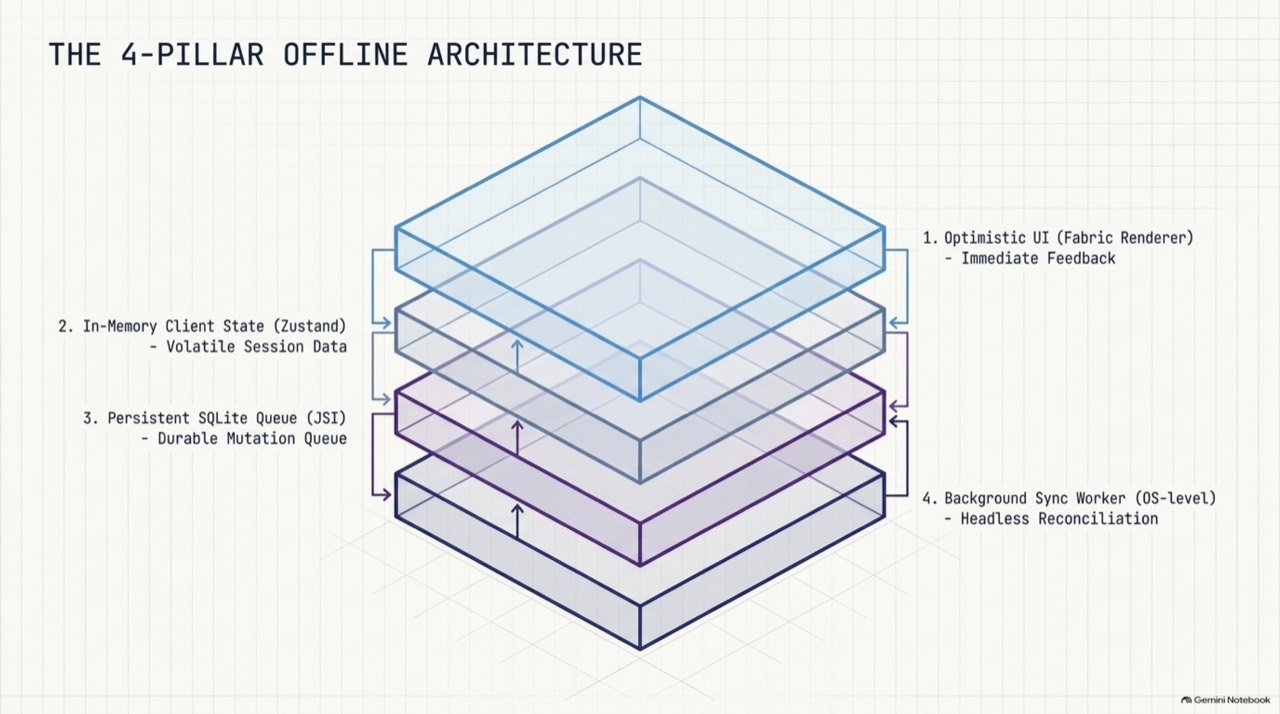
- The four parts of an offline design.
- Persist the small mutation, and not the whole state.
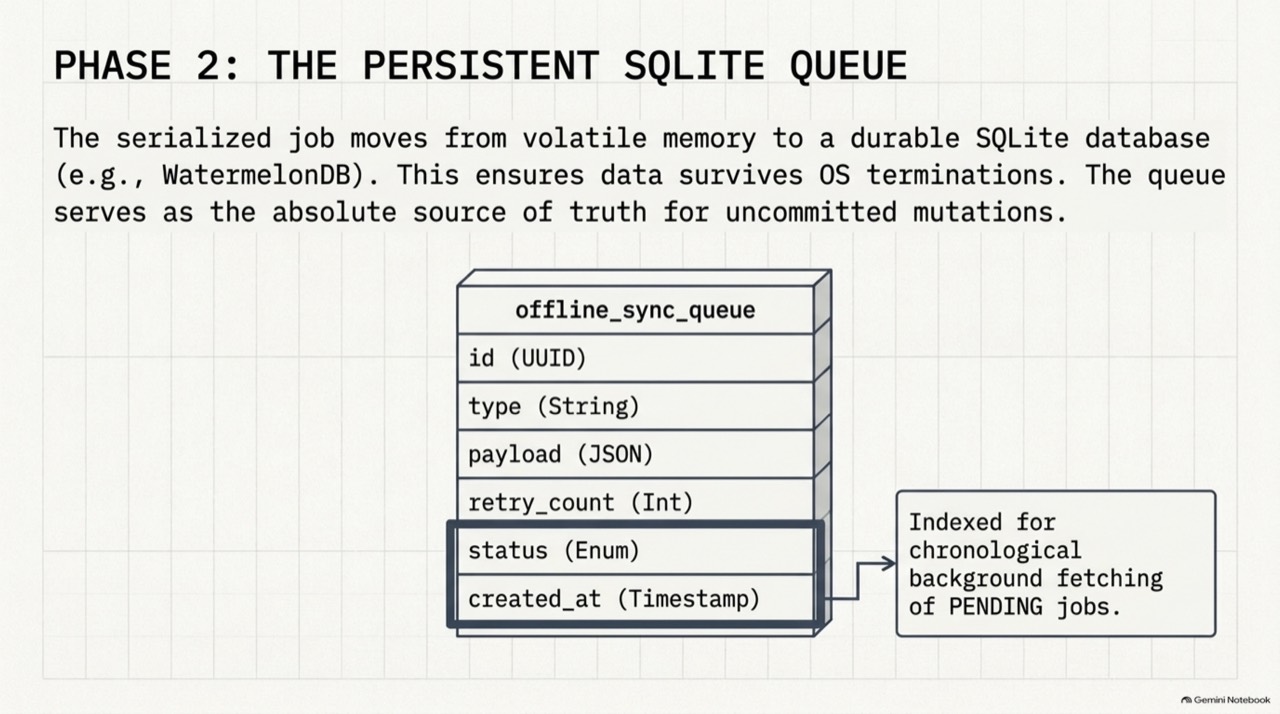
- The queue table, indexed for oldest-first reads.
- A worker wakes, reads pending rows and sends them.
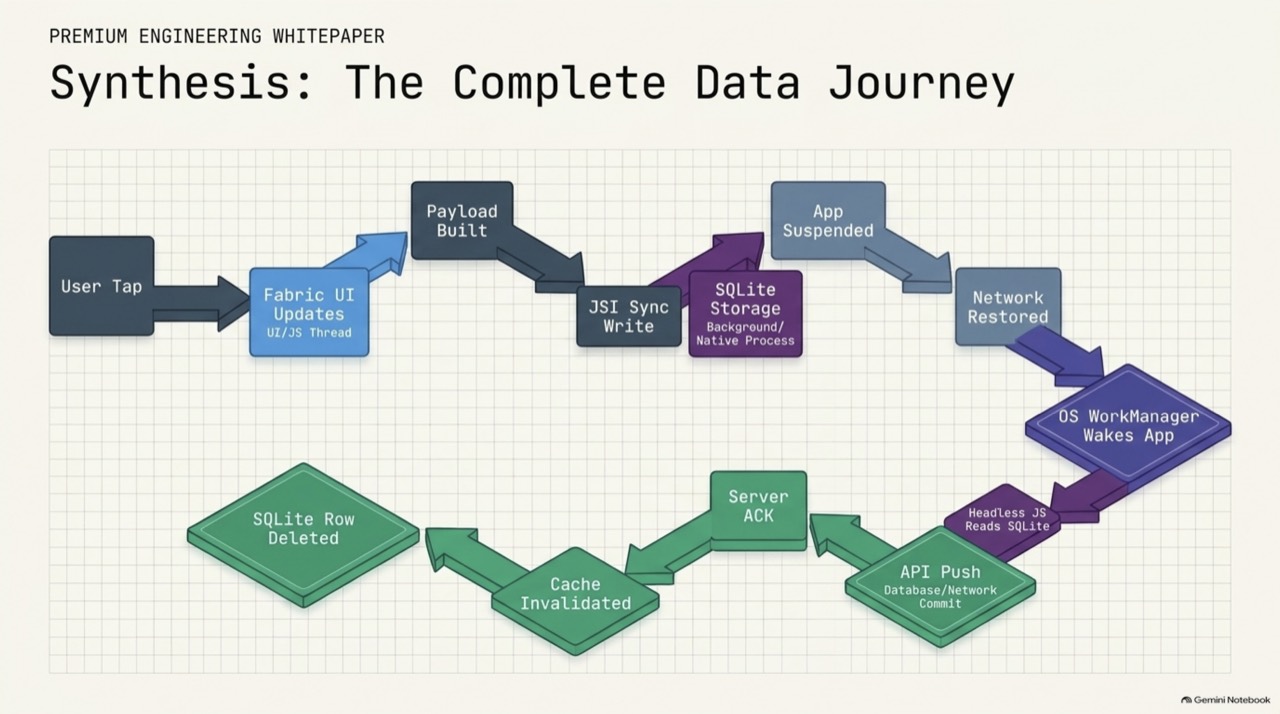
- The lifecycle of one queued change.
- The UI reads only local data, and every action also queues a mutation.
- A worker pops the oldest change, the server merges or refuses, and the queue clears or rolls back.
- What each OS lets you run in the background, and the rule that follows.
- Chunk the file, stream it through binary buffers, and save which chunk is next.
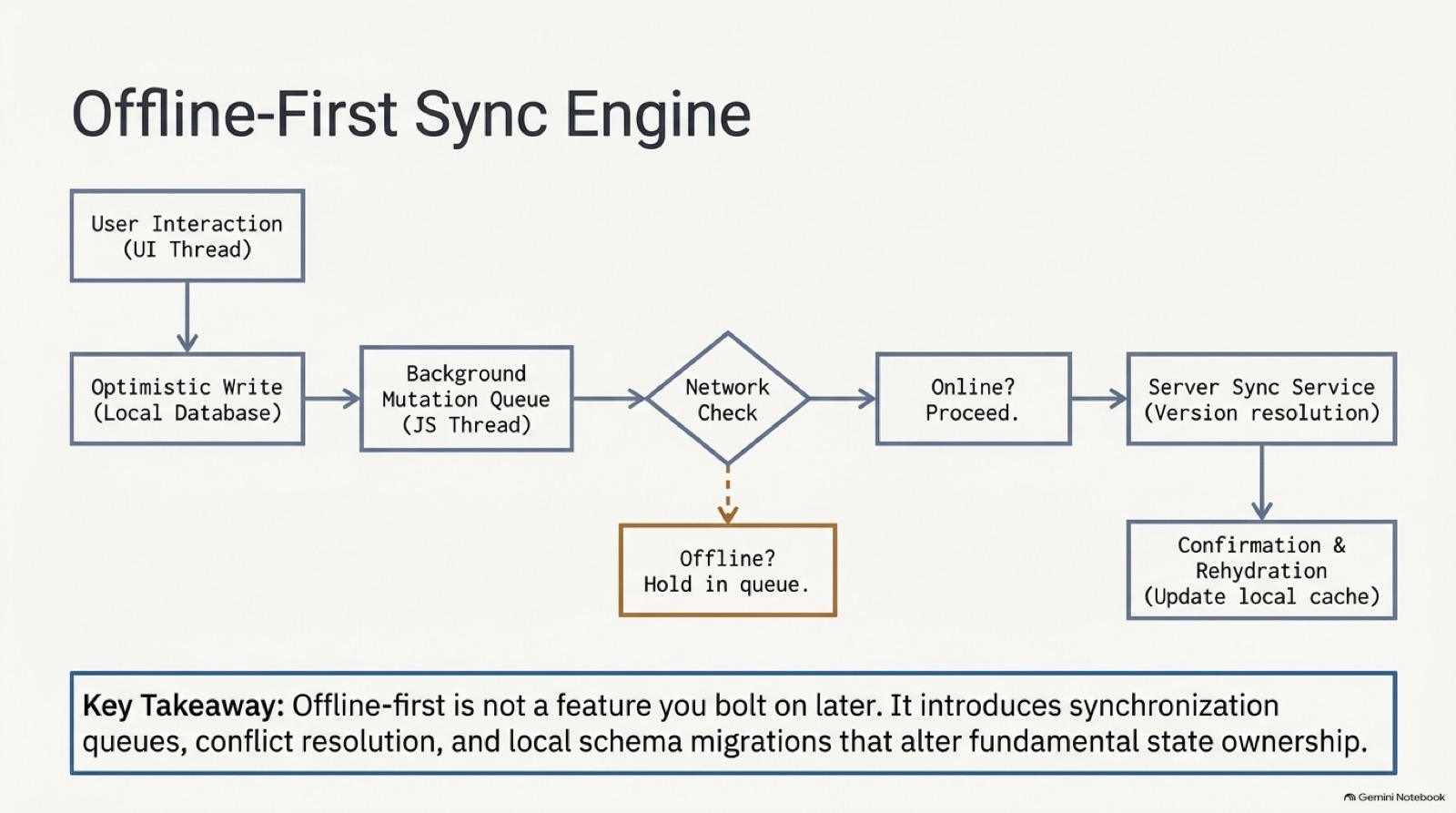
- The offline-first path: write locally, queue, check the network, sync, then confirm.
- Large files go up in resumable chunks, and background work belongs to the operating system.
- One change, from tap to server acknowledgement.
- Small JSON through the query layer, large files through native transfer code.
Q&A
What interviewers ask next. Answer out loud, then open.
4.1Interview questions
Why not persist the whole app state?
The queue write happens after the cache update. What's wrong?
Why do 409 and other 4xx stay on disk?
Why stop at the first network error?
Should the sync run in headless JavaScript?
Why does offline-first change the app's state model?
Why not upload a large video in one request?
What changes on iOS and Android for background sync?
How does a transfer manager survive a crash?
Extra depth
Edge cases, counterpoints and what to read next.
5.1Edge cases and counterpoints
Includes the strongest argument against this approach.
Show detailsHide details
- Compared with the deep dives
- The sync engine and transfer manager pages cover the whole system: server versions, field merge, and resumable uploads. This module covers the React Native side. The background sync article has a 15-slide overview of the whole system.
- Debugging from the field
- Store each entry's attempts and last error. Support teams then see why a change is stuck.
- Counterpoint
- A read-mostly app with rare edits may need only a retry on a failed request, and a queue adds more than it saves.
- From tap to confirmation
- The path is a local write, a queued mutation, a network check, a sync to the server's version service, and then a confirmation that updates the local cache. Each arrow in that path is a place a change can wait, so decide what the user sees at each.
- Streaming and memory
- Reading a 500 MB video into a JavaScript string can run the app out of memory. Stream it from disk through binary buffers in native code, one chunk at a time.