Basics
The whole idea first, then the terms the rest of this page uses.
1.1Whole idea
Group code by feature, not by file type. Then give each feature one public entry point, and let tooling reject imports that go around it. A feature is truly modular when you can delete it by editing only the shell that registers it. Move up to workspaces and runtime loading only when the team or the number of apps demands it.
Codebases rarely fail from network speed. They fail from merge conflicts and features that can't be removed.
1.2Key concepts
One idea per card, in plain words.
Screens, state and data access for one capability live together, such as auth or checkout.
Each feature exposes a single index file. Everything else in the folder is private.
A lint rule or build check that fails when one feature imports another's private file.
A feature or shared library in its own package inside one repository. Several apps then depend on the same versions.
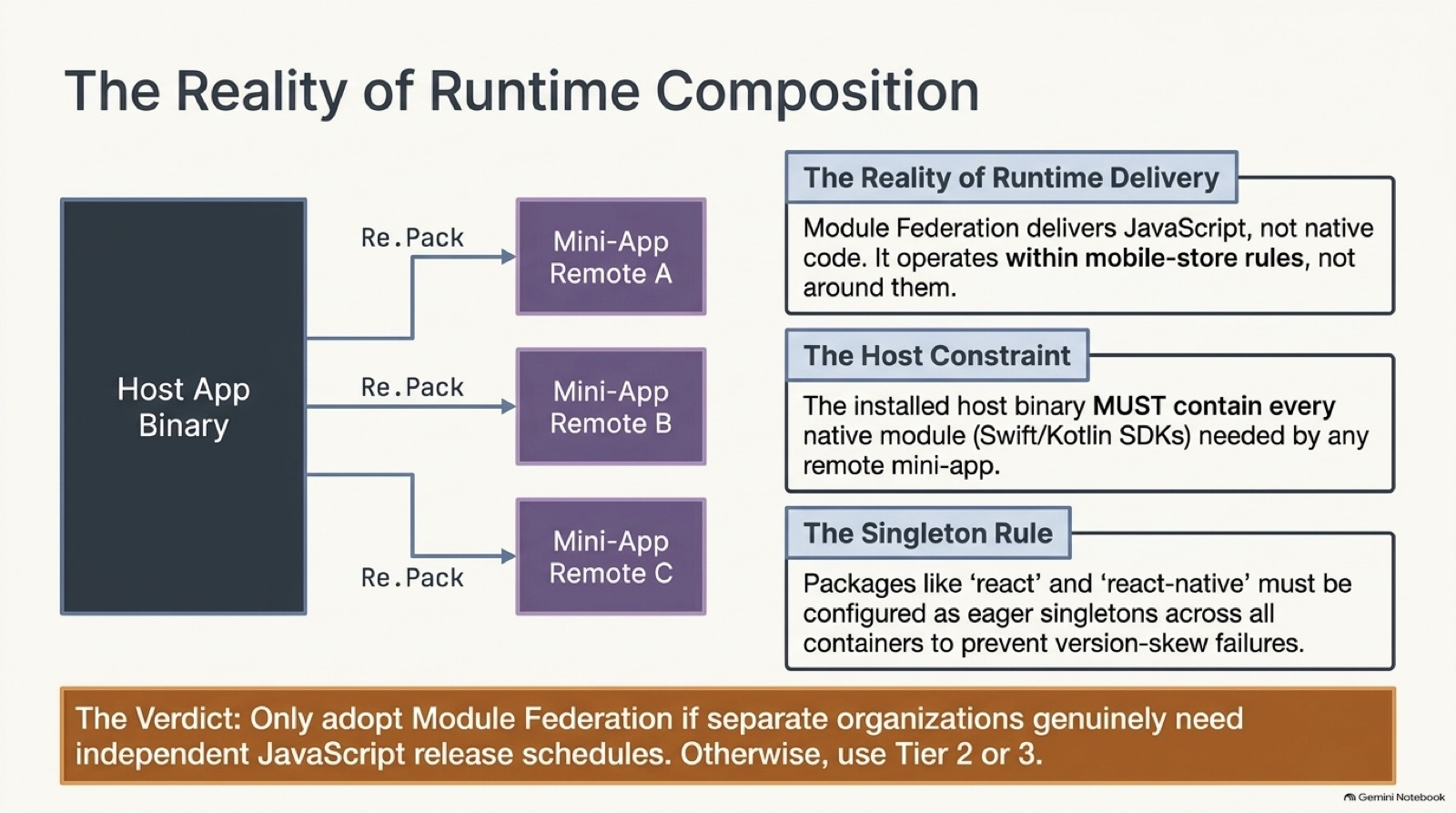
Loading JavaScript mini-apps at runtime, for example through Module Federation with Re.Pack. Native modules must already be in the app binary.
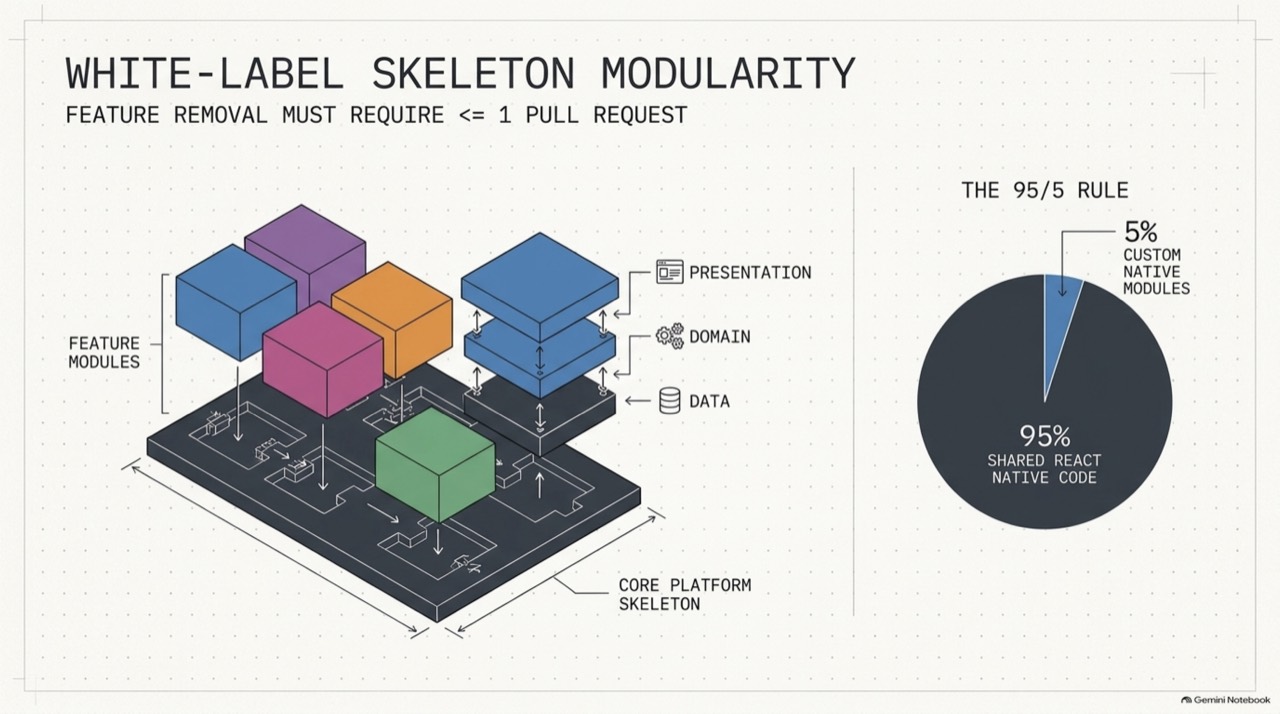
Several branded apps built from one codebase, differing in theme, configuration and which features they include.
The installed app. Every native module a mini-app needs must already be in it, because Module Federation delivers JavaScript only.
Packages such as react and react-native must resolve to one shared copy across the host and every remote. Two copies cause version-skew failures.
Question
What exactly you must answer, and what to settle before you start.
2.1Question
Twelve teams share one React Native app, and merges keep breaking each other. A partner wants a branded version with half the features. Design the structure.
2.2Clarify first
Each answer removes a guess.
| You ask | Answer |
|---|---|
| How many apps and how many teams? | Two apps now, and a third coming. Twelve teams touch the main one. |
| What differs between the apps? | Branding, a few features, and some business rules. |
| Can features ship separately? | Through the store only. Runtime loading is not approved. |
Detailed answer
How it works, and how to build or explain it.
3.1Step by step
The mechanism, in the order you would explain it.
- Start with feature folders
Give each capability its own folder with a public index. Most teams get most of the benefit here.
- Enforce the boundaries
Add a lint rule that rejects private cross-feature imports and shared code importing features. A convention that nothing checks erodes in a month.
- Keep a registry in the shell
The app shell lists which features are installed. Removing a feature then changes the registry and the feature folder, and nothing else.
- Test removal
Compute which files outside a feature import it. If more than the registry shows up, the boundary has leaked.
- Move to workspaces for a second app
Put design tokens, the network client and the features in packages, and let each app pick versions and override themes.
- Consider runtime loading last
It lets teams ship JavaScript separately, and adds versioning and compatibility problems. Native dependencies still ship in the binary.
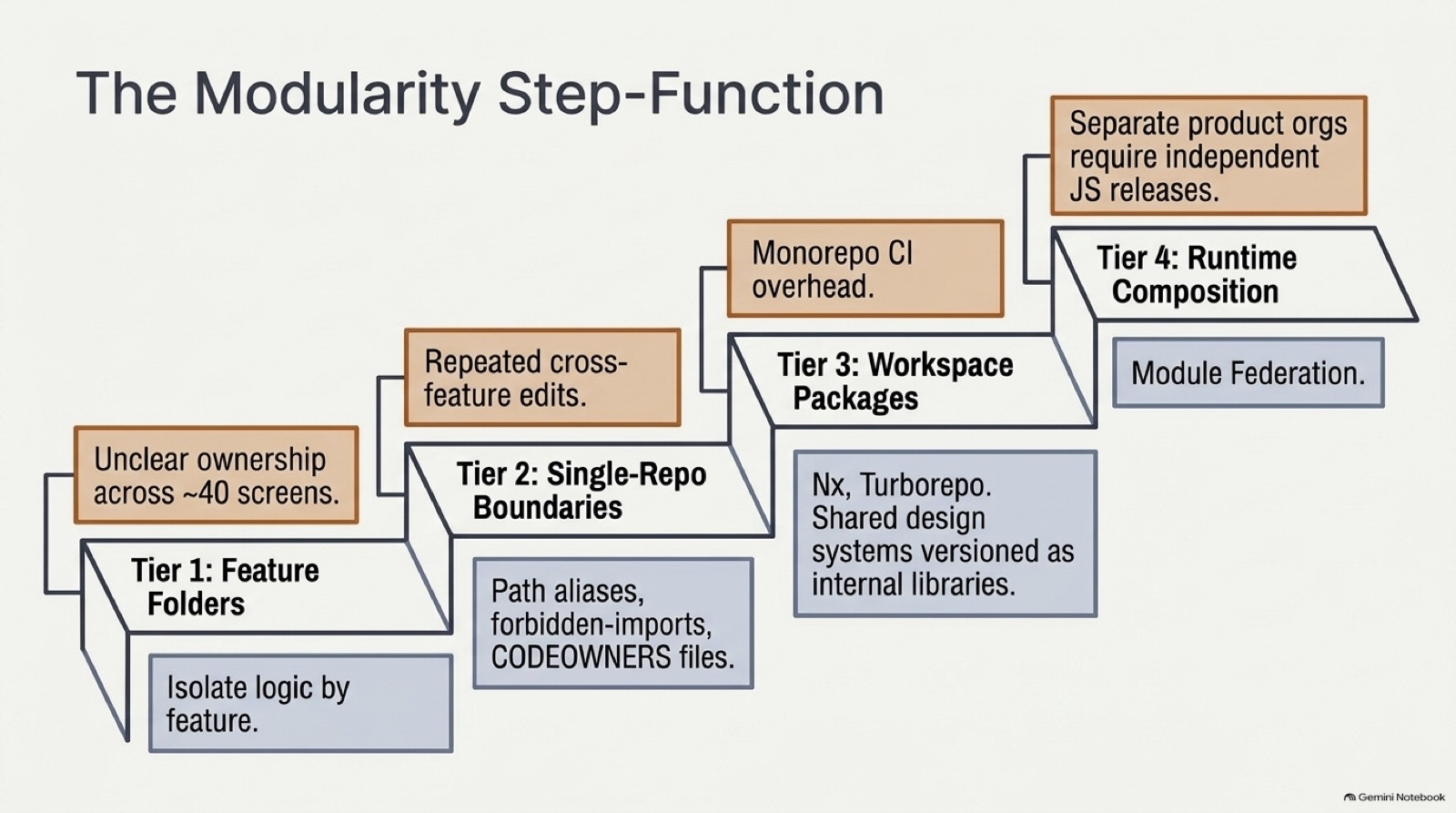
3.2The ladder
| Tier | Adds | Costs | Use when |
|---|---|---|---|
| 1. Feature folders | Code that changes together lives together | Almost nothing | Always |
| 2. Enforced boundaries | Rules that stop leaks | A lint config to maintain | More than one team |
| 3. Workspace packages | Shared versions across apps, themed overrides | Build tooling and release discipline | A second app |
| 4. Runtime composition | Separate release of JavaScript parts | Version matrix, harder debugging | Independent release trains |
3.3Code
Working code for the core of it.
Keeping features independent
A small version of the lint rule behind a modular codebase. It reads files and their imports, and reports the ones that break the rules.
1/* A small version of the lint rule that keeps feature folders independent. Paths look like src/features/auth/index.ts. */2export interface SourceFile {3 path: string;4 /** the files this one imports, already resolved to paths */5 imports: string[];6}7export interface Violation {8 from: string;9 to: string;10 rule: "private-import" | "shared-imports-feature";11}12 13const featureOf = (path: string) => /^src\/features\/([^/]+)\//.exec(path)?.[1];14const isPublicEntry = (path: string) => /^src\/features\/[^/]+\/index\.ts$/.test(path);15const isShared = (path: string) => path.startsWith("src/shared/");16 17export function checkBoundaries(files: SourceFile[]): Violation[] {18 const out: Violation[] = [];19 for (const file of files) {20 for (const to of file.imports) {21 const target = featureOf(to);22 if (!target) continue;23 if (isShared(file.path)) out.push({ from: file.path, to, rule: "shared-imports-feature" });24 else if (featureOf(file.path) !== target && !isPublicEntry(to)) out.push({ from: file.path, to, rule: "private-import" });25 }26 }27 return out;28}29 30/** Everything outside a feature that still touches it. Removing the feature means editing exactly these files. */31export function removalImpact(files: SourceFile[], feature: string): string[] {32 return files33 .filter((f) => featureOf(f.path) !== feature && f.imports.some((to) => featureOf(to) === feature))34 .map((f) => f.path)35 .sort();36}37 38/** Two features that import each other can't be removed or tested alone. */39export function featureCycles(files: SourceFile[]): [string, string][] {40 const edges = new Set<string>();41 for (const f of files) {42 const from = featureOf(f.path);43 if (!from) continue;44 for (const to of f.imports) {45 const target = featureOf(to);46 if (target && target !== from) edges.add(`${from}>${target}`);47 }48 }49 const cycles: [string, string][] = [];50 for (const e of edges) {51 const [a, b] = e.split(">");52 if (a < b && edges.has(`${b}>${a}`)) cycles.push([a, b]);53 }54 return cycles.sort();55}isPublicEntry(to)- Another feature may import only the index file. Anything deeper is private.
shared-imports-feature- Shared code must not depend on a feature, or the shared package could never be used by another app.
removalImpact- Lists the files outside a feature that import it. For a clean feature, this is just the registry in the app shell.
featureCycles- Two features importing each other can't be tested, removed or released alone.
Tested by npm run test:modules.
3.4Slides
From the source decks this page draws on. Swipe, use the arrows, or press the left and right keys. Notes flag where a slide's numbers or flow differ from this page.
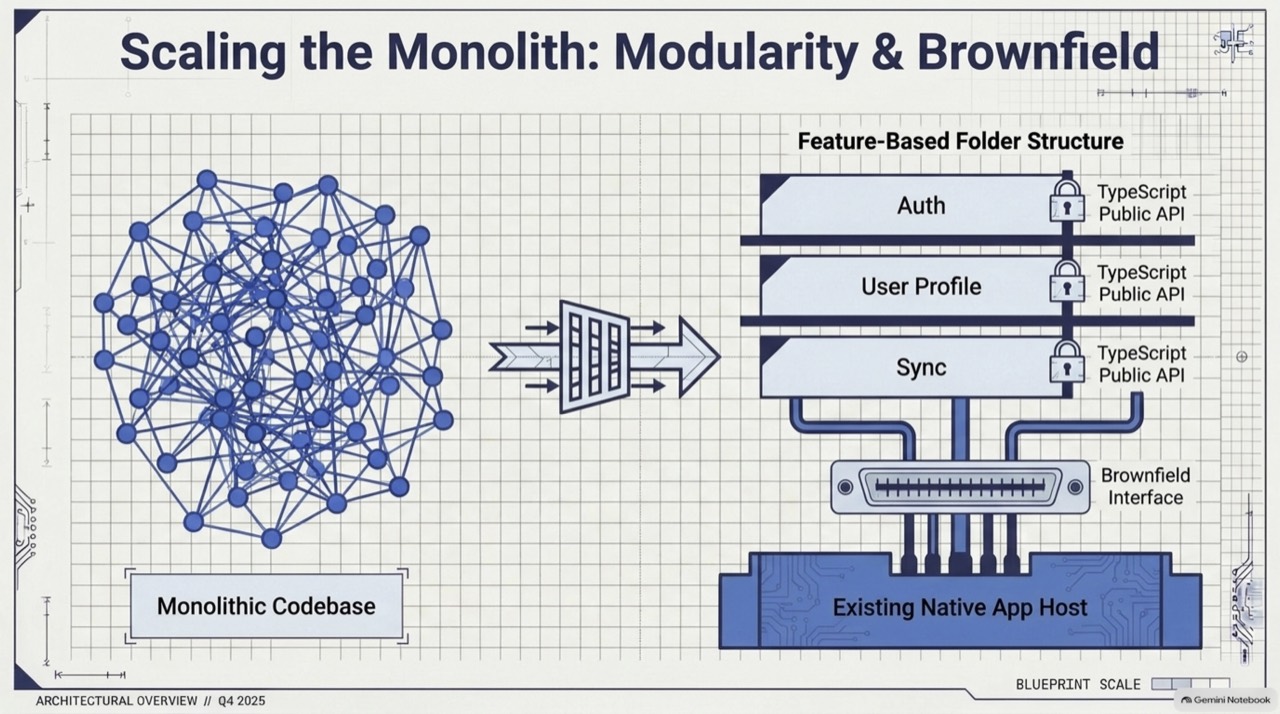 ‹›
Feature folders with public APIs, hosted inside an existing native app.
- Feature folders with public APIs, hosted inside an existing native app.
- A shared skeleton, with features removable in one pull request.
- Climb one step only when the pain in the box above it shows up.
- Runtime composition ships JavaScript only, and the host must already hold every native module.
Q&A
What interviewers ask next. Answer out loud, then open.
4.1Interview questions
Why group by feature and not by file type?
How do you know a feature is removable?
Can runtime composition ship new native code?
What goes wrong when features import each other both ways?
Why configure react and react-native as singletons?
When is Module Federation worth it?
Extra depth
Edge cases, counterpoints and what to read next.
5.1Edge cases and counterpoints
Includes the strongest argument against this approach.
Show detailsHide details
- Brownfield apps
- Inside an existing native app, the same feature rule applies. Expose React Native screens through a narrow interface that the native host calls.
- Ownership
- Pair each feature folder with a code owner, so review follows the boundary.
- Counterpoint
- A single small team gains little from tiers 3 and 4. Build the next tier when the pain arrives, and not before.
- Store rules
- Runtime delivery of JavaScript works within store policy, and not around it. Read each store's current rules on what an app may download and run before you plan on it.
- Signs you have outgrown a tier
- Tier 1 fails when ownership is unclear across dozens of screens. Tier 2 fails when one change keeps editing several features. Tier 3 fails when continuous integration for the whole repository gets slow. Each failure points to the next step.